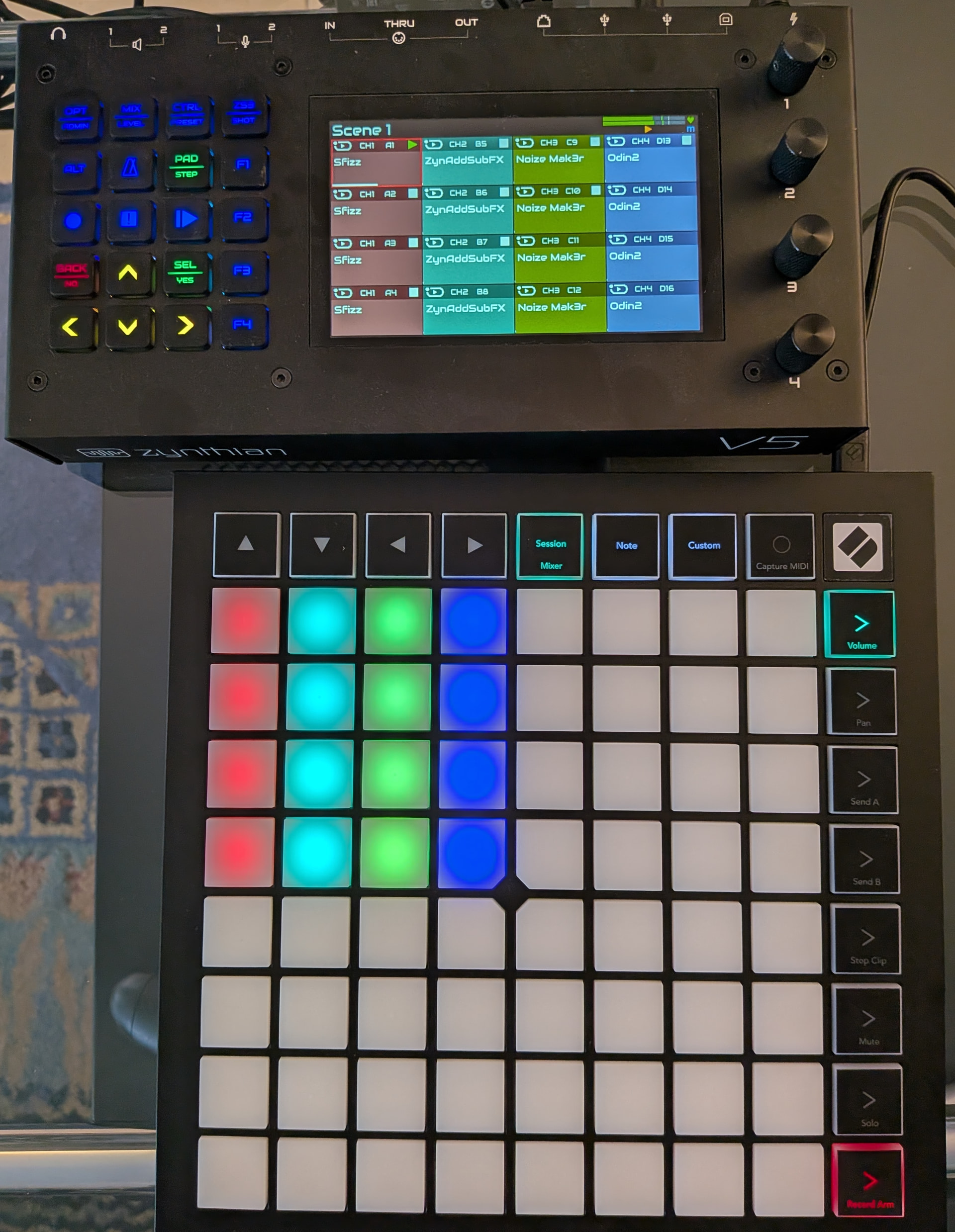
Sure try it out and let me know how it goes. I haven’t figured out how to map the knobs to the encoders on the mixer screen, but I did manage to give functionality to all the other buttons. Check my notes on github.
1 Like
I’m working on a driver for my Launchkey Mini 37, everything is working how I want except I’ve ran into a midi limitation. I have 4 knobs set to the zynpots and that works but in menus with over 127 items (Vitalium for example) it gets stuck when it hits 127. Is there a proper way to implement this?
Here’s what I have so far, it’s more focused on performance. First bank(up arrow) of knobs are mixer controls, second bank(down arrow) are zynpots on the left, top row of pads are solos for mixer, bottom row are mutes, up arrow in the pad area is presets, down arrow is menu, right arrow is back, Func is Select. Everything works but the pads don’t update in realtime, I put a delay on startup for 10 seconds to make sure chains are loaded first, that’s mainly what I’m focusing on at the moment. There’s some code in that I need to clean out from failed attempts to do this. There’s also the issue from my last post of the zynpots not being built for midi. It’s still a little buggy but functional.
You should condifigure the Launchkey to use incremental encoders, not aboslute then use nudge up/down CUAI calls.
1 Like
I tried that before trying wrapping(which was a fail too) but I think my implementation was off in some way. I’m very much still learning. I’ll revisit it and double check the programming guide for the launchkey. Thanks.
Pads update with the mixer in real time and knobs are fixed, buttons are also remapped to better positions(Func is Menu, > is Sel, up on the pad arrows is Back, down is Preset) . I’m 100% happy with this now. It’s complete for me and hopefully others. Thank you.
1 Like
I’ve done a lot with this now. A quick rundown:
Knobs
Up and Down buttons cycle through 3 banks:
Bank 0(Up arrow) - MIXER MODE
- Knob 1 (CC 85): Chain 0 Level
- Knob 2 (CC 86): Chain 1 Level
- Knob 3 (CC 87): Chain 2 Level
- Knob 4 (CC 88): Chain 3 Level
- Knob 5 (CC 89): Chain 4 Level
- Knob 6 (CC 90): Chain 5 Level
- Knob 7 (CC 91): Chain 6 Level
- Knob 8 (CC 92): MASTER Level
Bank 1(Down arrow) - CONTROL MODE (Default on startup)
- Knob 1 (CC 85): ZYNPOT 0 (Main Rotary 1)
- Knob 2 (CC 86): ZYNPOT 1 (Main Rotary 2)
- Knob 3 (CC 87): ZYNPOT 2 (Main Rotary 3)
- Knob 4 (CC 88): ZYNPOT 3 (Main Rotary 4)
- Knob 5 (CC 89): Arrow LEFT/RIGHT
- Knob 6 (CC 90): Arrow UP/DOWN
- Knob 7 (CC 91): Preset Browse (Previous/Next)
- Knob 8 (CC 92): BACK (CCW) / SELECT (CW)
Bank 2 - CC PASSTHROUGH MODE
- Knob 1-8 (CC 85-92): Send CC 24-31 to synths
Pads
Top Row (Notes 96-103):
- Pads 0-6: SOLO for Chains 0-6 (skips master if in chain list)
- Pad 7: OFF (no solo for master)
Bottom Row (Notes 112-119):
- Pads 0-6: MUTE for Chains 0-6 (skips master if in chain list)
- Pad 7: MUTE for Master Channel
Buttons
Navigation:
- > (CC 104): Select
- Func (CC 105): MENU
- Pad Up (CC 106): BACK
- Pad Down (CC 107): PRESET
Additional Transport:
- Play Button (CC 0x73): TOGGLE_PLAY (normal) / TOGGLE_MIDI_PLAY (with Shift)
- Record Button (CC 0x75): TOGGLE_RECORD (normal) / TOGGLE_MIDI_RECORD (with Shift)
Press Durations
- Short: < 0.5 seconds
- Bold: 0.5 - 1.5 seconds
- Long: > 1.5 seconds
LED Feedback
Pads:
- Solo Active: Yellow/Orange
- Solo Inactive: Dim White
- Muted: Red
- Unmuted: Green
Notes
- Master channel is always on the far right
- Default startup bank for knobs is Bank 1 (Control Mode)
Next up I’m tackling a second pad mode or bank with a step sequencer. 
5 Likes
Sorry, does anybody have a Launchpad X at hand an can confirm it provides the same or another functionality in session mode than mine?
Actually clip launching completely works for me, but the pads are not lit at all. I think this behaviour changed.
I’m on latest Oram staging and the LPX firmware was updated with the 2.01 release I remember.
I tried a Launchpad X a few months ago and didn’t get the pads lit with the color of the sequencer at all. Everything remained dark. But again that was a previous Oram release and i can’t currently retry it.
On the same day we tested a APC Key 25 and that worked perfect with the pad colors and functions.
Sorry that i can’t retry right now, I just replied because the Launchpad X driver didn’t work months ago and it’s maybe not a new bug.
Thanks, I’m sure it worked last time (long time ago), but I rareky connected it to the Zynth and I have been late to the firmware update party, so I wonder if the ctrldev just works with a specific software version of the Launchpad X.
Hello , I am French so excuse poor English
The LauchPAD X is very similar to the LaunchPAD Mini MK3 that I own and
which has a perfectly working driver
So if you SSH to Zynthian and go to
/zynthian/zynthian-ui/zyngine/ctrldev
you will find all the drivers and the one for Mini MK3 which is called zynthian_ctrldev_launchpad_mini_mk3.py
the one for LaunchPAD X (which I suppose you use actually) is called
zynthian_ctrldev_launchpad_x.py
so make a copy of this one like
cp zynthian_ctrldev_launchpad_x.py zynthian_ctrldev_launchpad_x.py.old
now you have to make some change to zynthian_ctrldev_launchpad_mini_mk3.py
with nano
you have to replace
dev_ids = ["Launchpad Mini MK3 IN 1"]

with

dev_ids = ["Launchpad X IN 1"]

and

msg = bytes.fromhex("F0 00 20 29 02 0D {} F7".format(data))

with

msg = bytes.fromhex("F0 00 20 29 02 0C {} F7".format(data))

and you save the modified file with the name zynthian_ctrldev_launchpad_x.py

I do not have a LauchPAD X but I have a Mini MK3 and a Pro MK3 and I was able to have a working driver for my Pro MK3 with this method


CAREFUL

If you make a update of Oram , your new zynthian_ctrldev_launchpad_x.py will be
overwritten with the old one that is not working so make a copy somewhere out of
Zynthian folder


Good Luck
2 Likes
Thanks, about to try this. Can you clarify?
The current version of zynthian_ctrldev_launchpad_mini_mk3.py reads:
and not
msg = bytes.fromhex("F0 00 20 29 02 0D {} F7".format(data))
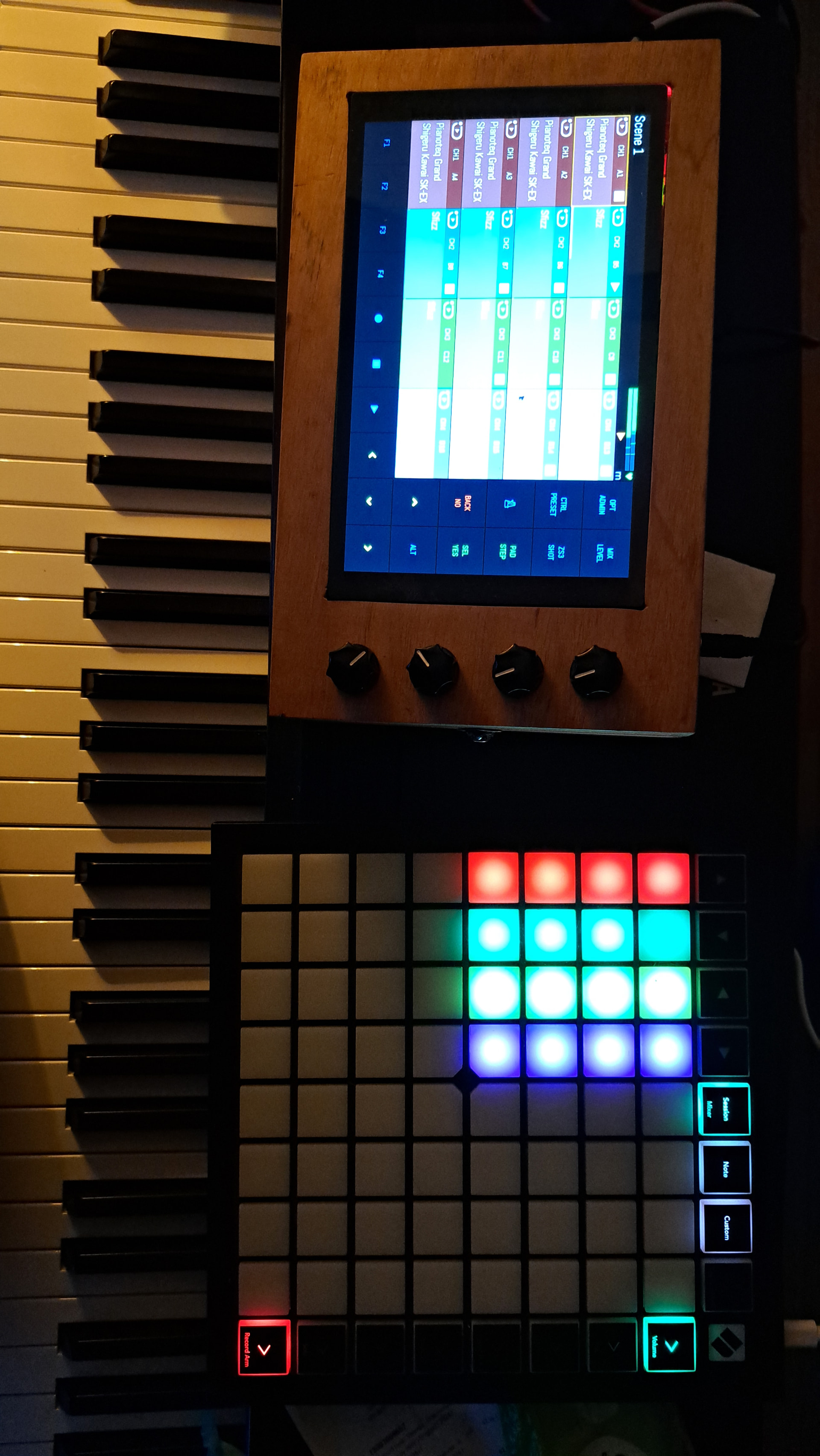
Ok, I got it. It works, including the arrow keys. I had to replace the class name as well.
I did copy the zynthian_ctrldev_launchpad_mini_mk3.py like you suggested and replaced:
class zynthian_ctrldev_launchpad_mini_mk3(zynthian_ctrldev_zynpad):

    dev_ids = ["Launchpad Mini MK3 IN 1"]
    driver_description = "Zynpad + arrow keys integration"

    PAD_COLOURS = [6, 29, 17, 49, 66, 41, 23,
                   13, 96, 2, 81, 82, 83, 84, 85, 86, 87]
    STARTING_COLOUR = 21
    STOPPING_COLOUR = 5
    SELECTED_BANK_COLOUR = 29
    STOP_ALL_COLOUR = 5

    def send_sysex(self, data):
        if self.idev_out is not None:
            msg = bytes.fromhex(f"F0 00 20 29 02 0D {data} F7")
            lib_zyncore.dev_send_midi_event(self.idev_out, msg, len(msg))
            sleep(0.05)
with
class zynthian_ctrldev_launchpad_x(zynthian_ctrldev_zynpad):

    dev_ids = ["Launchpad X IN 1"]
    driver_description = "Zynpad + arrow keys integration"

    PAD_COLOURS = [6, 29, 17, 49, 66, 41, 23,
                   13, 96, 2, 81, 82, 83, 84, 85, 86, 87]
    STARTING_COLOUR = 21
    STOPPING_COLOUR = 5
    SELECTED_BANK_COLOUR = 29
    STOP_ALL_COLOUR = 5

    def send_sysex(self, data):
        if self.idev_out is not None:
            msg = bytes.fromhex(f"F0 00 20 29 02 0C {data} F7")
            lib_zyncore.dev_send_midi_event(self.idev_out, msg, len(msg))
            sleep(0.05)
(plus the comments)
Still wondering where you got the lines from you suggested.
I’m still holding back from making a PR because I don’t know if I omit any functions @Wapata implemented in the original Launchpad X ctrldev.
If those devices work exactly the same except for sysex the drivers could also quite easily be merged in the end, or subclassed.
Okay
My 70 yo brain is sometimes a little lazy and I forgot to mention the fact that you also had to
change the name of the class.
About the way I got it to work is
If you look in the “oficial” driver for LaunchPAD X you will notice that some functions (or methods)
are different
for the lighting of the green arrows (to choose Zynpad Banks) on the right
it was :
def refresh_zynpad_bank
it is now
def update_seq_bank
and for the lighting of the pads
it was
def update_pad
it is now
def update_seq_state
So my best guess is that those old functions (or methods) worked in the old days
and do not work anymore
Anyway
Happy for you 
Regards
And about the PR ,
I had very much trouble to make one for my LaunchPAD Pro MK3 driver (that I own)
So I do not want to get into the same trouble with a PR for a driver for a device that I do not own
because if something changes in the Zynthian guts ,I will not be able to test it
Alain
I am not a Python Wizard but I think that those 2 instructions
msg = bytes.fromhex(f"F0 00 20 29 02 0D {data} F7")
msg = bytes.fromhex(“F0 00 20 29 02 0D {} F7”.format(data))
work the same way
it is just a different syntax
3 Likes
I found the date when old functions were replaced for LP mini MK3
(but not for other LP models)
Dec 11, 2023
+ Implement signals in zynseq, zynpad and Launchpad MK3 Mini driver.
+ Lot of fixes and improvements related to the new signaling system and ctrldev drivers.
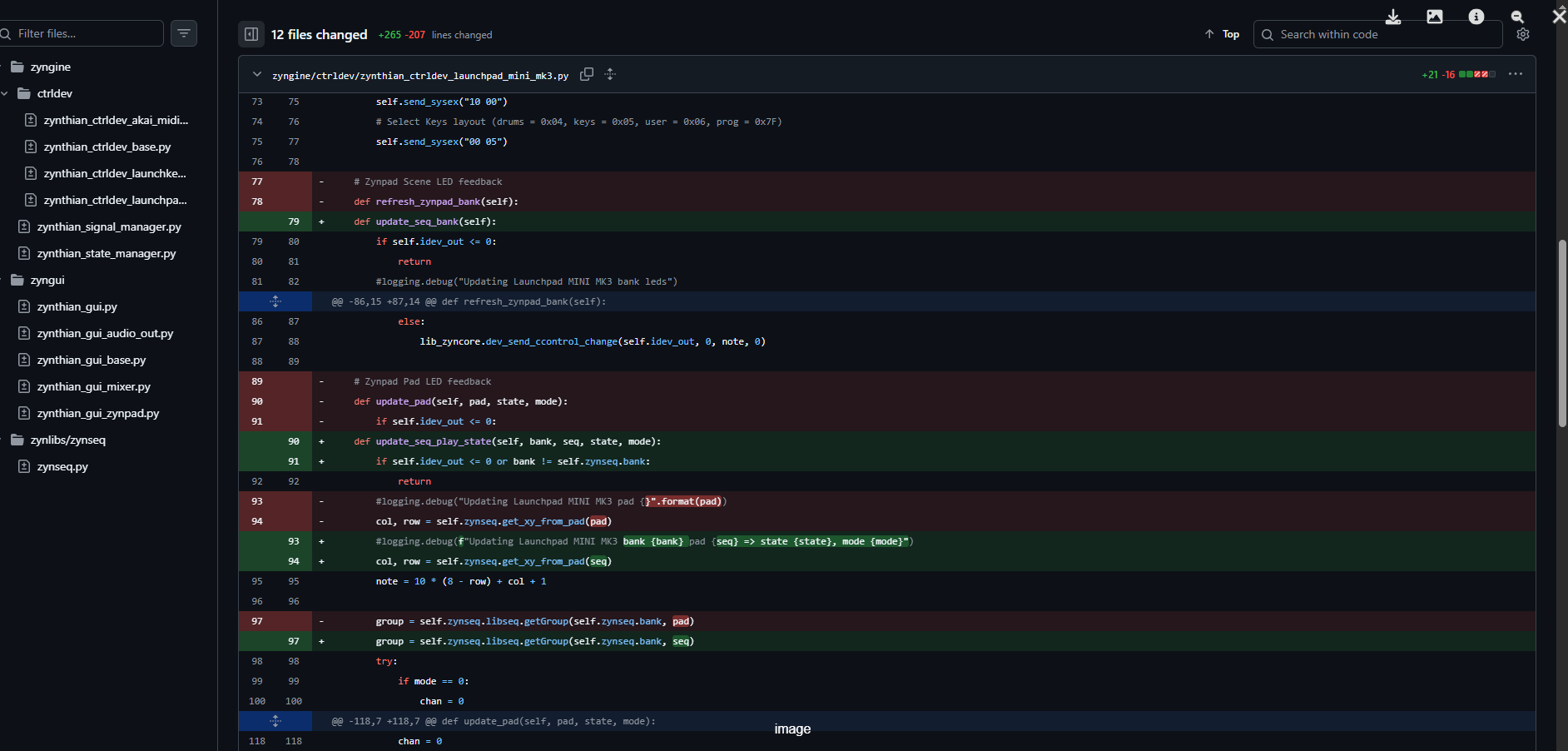
So I guess , Mystery Solved
So, like stated above I can confirm that Launchpad X works as intended when applying these changes to the Launchpad Mini MK3 driver.
I just don’t have the courage to do the PR because I don’t read python fluently and cannot confirm if this would omit functions @Wapata included in the old (non functional) driver.
Here’s what I tested and is working with these changes:
- Session Mode accessable
- Arrow Keys
- Stop all
- Reflection of Zynpad, including flashing feedback for start, stop, running pattern
Here’s what I guess is working but cannot confirm yet:
- Scene change
So if anybody can compare these, go ahead