Qmidinet routing between 2 zynthians

Hey everybody!
I’m new to Zynthian, and I’ve been loving the freedom of the platform and support of the comunity.
I came across the project out of necessity.

I’m setting up a live looping rig that needs to fit into a 75 x 45 cm pedalboard case, in order to bring it on the street for busking.
The rig is centered arounf a Boss rc505 mk2, and I ended up needing to use 2 zynthians.
On the first Zynthian I handle keys and drum sounds, I’ve hooked up a 37 keys controller and a drum pad.
On the second one I run hi-pass filters and compression for my two mics.
I need different buffer sizes for the two tasks, thus the two zynthians.

I’m also connecting a midi pedal board to the whole system, and I need it to control different stuff on the two zynths and on the Loop station too.
I’m guessing the best way to do that would be to use Qmidinet via ethernet, choose a zynth to connect the pedalboard to, and make it so some channels go to the other zynth, some go to the loopstation, and some to the internal chains. The I would just need to program the pedalboard to send midi t the channel I need, depending on what device I want to control with that specific command.

What would be the Patchage routing needed to do that?
Or is there a completely different way to better achieve what I need?

1 Like

Hi @albyconcalma ,
let me point you in the right direction. You’ll probably handle the connection between the two Zynthians with QMidiNet, but I would actually use a simpler solution: a USB–DIN MIDI converter.

More important is that two MIDI LV2 plugins were created which allow you to route MIDI signals out of Zynthian:
you enable them from the zynconfig web interface under ENGINE → MIDI tools, and they are:

CC Send (created by @riban)
MIDI Control External (created by @jofemodo)

During the testing phase, riban summed up their behaviour here:

For your use case, CC Send will probably be the better fit with ZS3 - Zynthian Sub-SnapShot.

Once you enable them, you can insert them into a chain in Zynthian via Add MIDI chain, then select category 5 – Other. Don’t forget to set MIDI Out in the Chain Options.

In general, any LV2 MIDI plugin should have its output routable to a chosen MIDI device, so you can (at least in theory) also use other plugins than the ones I pointed out.

EDIT: There is also an LV2 MIDI plugin called MIDI Thru – try whether the signal passes through it to the output you’ve selected.

1 Like

Because I was curious myself how this could be done, I started experimenting:

MIDI Thru plugin – if you set up the inputs and outputs correctly, it passes everything that comes in straight through, without any modification.

CC Send plugin – I tried a subsnapshot with Program Change activation on the same channel. It generates exactly what you’d expect, and here’s an example of what actually comes out (output from aseqdump on the monitoring RPi5):

132:3   Program change         12, program 1
132:3   Program change         15, program 36
132:3   Control change          9, controller 53, value 1
132:3   Control change          8, controller 54, value 2
132:3   Control change          7, controller 55, value 3
132:3   Control change          6, controller 56, value 4
132:3   Control change          6, controller 57, value 5
132:3   Control change          5, controller 58, value 6
132:3   Control change          7, controller 59, value 7
132:3   Control change          6, controller 60, value 8
132:3   Control change         11, controller 123, value 0
132:3   Control change         11, controller 120, value 0

Midi Event Map plugin – the plugin from https://github.com/x42/midimap.lv2 would be the most suitable, because you could prepare a preset that would transform an incoming Program Change into several outgoing Program Changes if the config file contained something like:

midimap v1
match-all

# Trigger: Program Change 2 on channel 12 (1-based)
# (status 0xCB, data 2)

0xCB 2 | CHN15 1   # PC 1 on ch 16
0xCB 2 | CHN14 2   # PC 2 on ch 15
0xCB 2 | CHN13 3   # PC 3 on ch 14

Unfortunately, I haven’t figured out any mechanism to get a custom preset / config file into Zynthian so that it shows up in the list. It also repeatedly froze on me when I tried to select a preset for this plugin (during plugin adding). EDIT: It can’t be inserted as the first engine from the main menu via Add MIDI chain. It can only be inserted via Add MIDI-FX. So this plugin is currently unusable in Zynthian.

2 Likes

Wow, this is so helpful, thank you so much.
Yesterday I ordered the usb to midi cable, it should arrive today, but I’m full of studio sessions and live events until tomorrow, I’ll have time to try stuff out on thursday.

Given that I’ll be performing with this rig on a regular basis, I’ll probably steer clear of Midi Event Map given its current unreliability. But it does seem very suitable for my use case, so I’ll be keeping an eye on future developments.

As of the other two, I’ll have to do some hands-on learning to really understand your suggestion, I’m not experienced enough yet.

I’m gonna try to split the outputs of a controller between Midi Thru and other internal plugins.
This seems to be the most straight forward simple solution, but given how much information goodness there is in the Riban post about CC Send, I’'ll probably dive into that anyway on thursday.

Thank you again for the great help, I’ll be posting about this after dipping my hands into the matter

I’ll try to be helpful and hopefully I won’t lead you down the wrong path.
My advice can’t be too specific, because I don’t know your full setup in detail, especially how you have everything configured.
Also, I prefer to keep my wording simple, because English is not my native language.

I understand your setup like this:

Zynthian #1 – instruments (keys & drums)

Role: Mainly a sound source (instrument engine).

Connected MIDI controllers:

  • 37-key MIDI controller (keys / synths). I assume it is connected via USB.
  • Drum pad (drums / percussion). I assume it is connected via USB.

Audio output:
The audio signal goes from this Zynthian to the Loop Station.

Zynthian #2 – vocal processing (FX for microphones)

Role: Effect processor for two microphones.
I assume this is vocals and guitar (or another acoustic instrument).

Audio chain:

  • Input: 2 microphones
  • Processing:
    • High-pass filters
    • Compression
  • Output: The signal goes to the Loop Station.

Boss RC-505mkII

  • Records audio loops, layering, etc.

MIDI pedal

I don’t know anything about this one yet.
It would be good to have some details (brand, model, how it sends MIDI).

Connection questions (Boss RC-505mkII & MIDI pedal)

With the Boss RC-505mkII and the MIDI pedal, you need to clarify how they will be connected:

  • Will MIDI go over USB or over DIN?

With my previous suggestion (USB–DIN MIDI converter), we are already using:

  • The DIN ports on one Zynthian, and
  • One USB port on the other Zynthian.

So the remaining options for connecting the Boss and the pedalboard depend on what ports you still have free.

Suggested step-by-step approach

I would recommend going step by step and exploring these areas:

  1. Network & webconfig at home/studio

    • At home or in the studio, connect both Zynthians to your network and access them via webconfig.
    • There you can configure everything comfortably.
    • When you go out to play, you can disconnect them and run them offline.
    • I recommend using wired Ethernet and turning Wi-Fi off on both units.
  2. Connect Boss RC-505mkII to a Zynthian and inspect MIDI

    • Connect the Boss RC-505mkII to one Zynthian and check what MIDI messages it actually sends.
    • You can monitor this via webconfig → INTERFACE → MIDI Log, where you select the port and message types.
    • This way you can see if it sends Start/Stop, clock messages, etc.
    • You will probably need to enable sending of these messages in the RC-505mkII settings – more details are in the Boss manual.
  3. Do the same with the MIDI pedal

    • Connect the MIDI pedal and again use the MIDI Log to see what it sends (CC, Program Change, notes, etc.).
    • This will give you a clear picture of what is available on the MIDI side.
    • After that, you can start building your routing.
  4. Learn ZS3 on Zynthian

    • On Zynthian itself, it really helps to understand how ZS3 works.
    • I spent some time digging into it myself and, together with the UI, I put together the following recommendations:

Just to clarify how snapshots, ZS3 and the master channel work in Oram (and why it matters for Program Change):

Snapshot vs. ZS3

  • Snapshot (.zss)
    A snapshot is the whole project:

    • chain layout (what engines/plugins are loaded where),
    • routing, mixer, MIDI learn,
    • plus the list of ZS3 stored inside it.
  • ZS3 (Subsnapshot)
    A ZS3 is a quick-recall “state” inside one snapshot:

    • for each chain: bank/preset, engine parameters, mixer levels, pan, mute/solo, key ranges, routing, MIDI learn, etc.
    • ZS3 does not change the chain layout – it only changes the state of what the snapshot already defined.

Multitimbral vs. Stage / Active mode

  • In multitimbral mode, recalling a ZS3 updates the state of all chains in the snapshot – it behaves like a global “scene” for the whole rig.
  • In stage/active mode, recalling a ZS3 effectively updates mainly the active chain (plus a few globals), leaving other chains more or less as they are.

So:

Snapshot defines what exists (chains/plugins).
ZS3 defines how it’s set up right now (presets, mixer, routing, etc.).

Program Change → ZS3

  • ZS3 are mapped to (MIDI channel, Program Change) pairs.
    That means you can use PC on any MIDI channel and have separate ZS3 sets per channel.

  • Typical workflow:

    • Enable “Program Change ZS3” in MIDI Options.
    • Enter ZS3 learn mode, send a PC from your controller.
    • Zynthian stores that ZS3 as channel / program.

So yes – you can use Program Change on multiple channels to drive different ZS3 sets.

Master Channel vs. ZS3

  • The master channel is mainly for global control:

    • snapshot Bank/Program changes,
    • “master key actions” for the UI.
  • On the master channel, Program Change and Bank Change are already used for snapshots and global actions.

That’s why it’s not recommended to trigger ZS3 on the master channel – PCs there can conflict with snapshot switching and other master functions.
Jofemodo himself has said: “please don’t use master Channel for ZS3”.

Practical recommendation

  • Use Program Change on regular MIDI channels (1–15) to recall ZS3.

  • Use the master channel (if enabled) for:

    • snapshot selection (Bank/Program),
    • global UI control,
    • not for ZS3 triggering.

Useful docs / threads


I believe that once you understand the individual pieces of the puzzle, you will be able to put everything together.

If for some reason it doesn’t work out, and if you still have space in your pedalboard for a small box, there is also the Blokas MIDIHub.
It is a programmable “brain” for processing MIDI signals of four MIDI DIN devices – so it’s actually a perfect match for your setup.
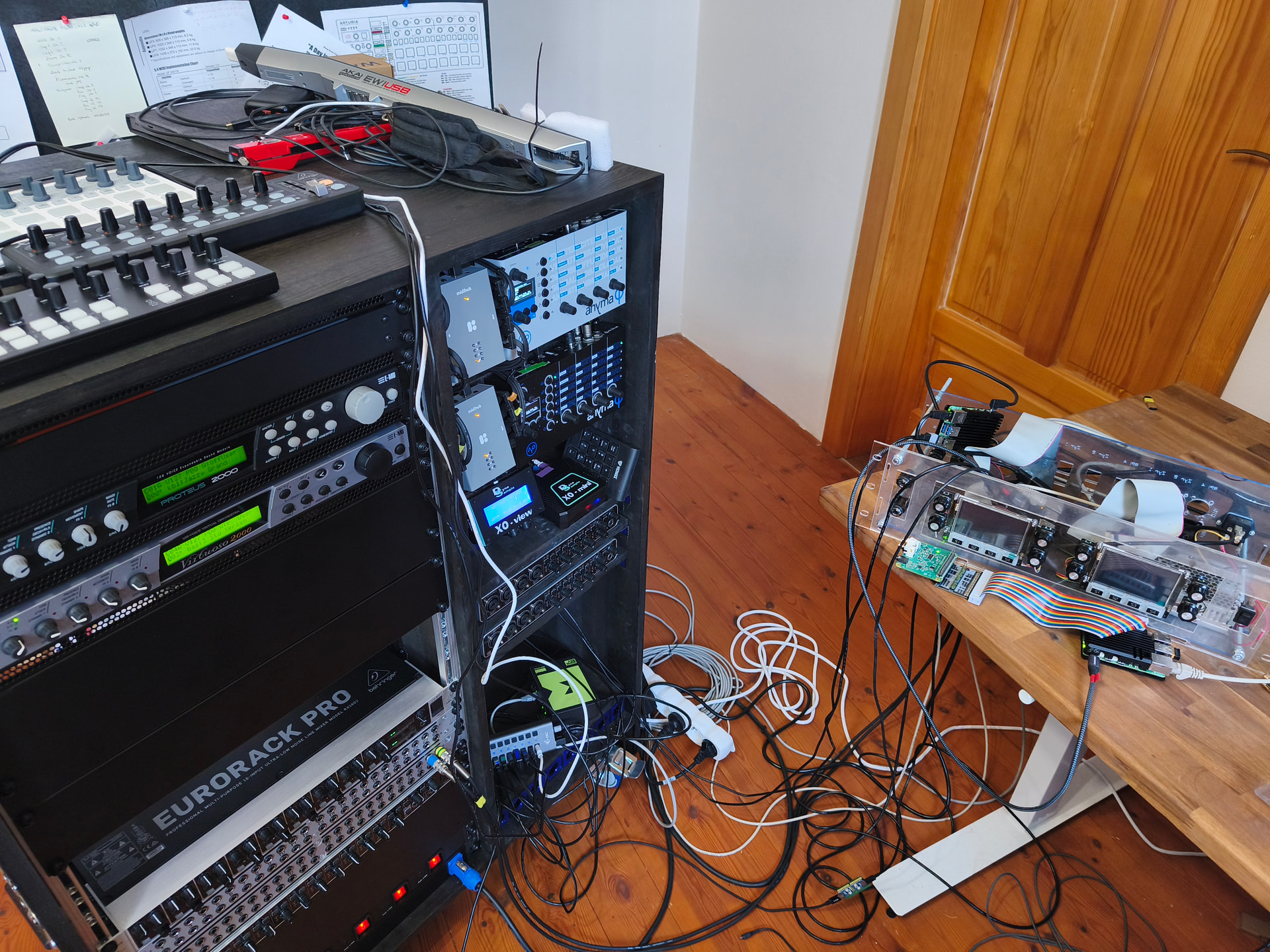
I personally own two of them. :slightly_smiling_face: My Twinthian is still outside the cabinet on the table on the right. It’s two Zynthians and one extra rpi5 placed in a 3U box. So one day they will be :slight_smile:


If you get stuck on something, let me know.

2 Likes

Are you making a Trinthian? :slight_smile:

1 Like

My brother, you are the best, this post has all I need, much much appreciated.

I’ll study everything you’ve directed me toward in the following days.
ZS3 in particular seems just like what I need.

In the meantime I’ll explain the setup in detail to you.

I put the switch 2 plugin on all the tracks on both zynthians, to switch the sound from left to right.
That’s because the loop station records every input it receives, and I need to be able to play an instrument while i loop another.
I busk with a single speaker, so the output can be mono, and I’m able to use one side of the stereo output as a through output.

The 2 mics are both vocal, one stays on the little table that has all the instruments on it, and the other is on a mic stand in front of the audience.
The guitar effects are handled by a multi effect processor, a Valeton GP-5, which I eventually want to be able to control via midi too.

The zynthians are not the original bundle. They are 2 RPi boxes with 2 touchscreens, and use external audio interfaces.
The one that is used as sound expansion uses a behringer uca222, since I only need output on it, the other one uses a behringer umc404hd.
The inputs are 2 microphones for vocal processing and stereo switching, the guitar muti effect pedal lust for switching, and the left output of the other zynthian, just to have all the through outputs coming out of a single cable, since my speaker has a 2 input mixer, and that enables me to avoid bringing an external mixer, which i don’t have the space for.

The RC 505 only receives midi, it doesn’t need to send anything (even though this may open many possibilities in the future) and it’s connected to the zynthian via usb.
All the midi controllers are connected to the zynthian, which then sends the right messages to the other zynthian and to the rc 505.

The keyboard only needs to play the sounds, no other midi. As of now I also use it to internally change the midi channel that it controls in order to change the sound, but I’d want to control that in the zynthian routing, to change sound with the drums controller.

The drums controller is a Presonus Atom, and other than the main pads to play drums it needs to send program change midi from the other side buttons, and from the 4 encoder knobs on top.
The side buttons need to control ‘undo overdub’ on the different channels of the loop station, and toggle the switch plugins on all zynthian tracks, and the knobs need to be assignable to different effects on the zynthians depending on the ZS3 preset.

The pedalboard is a Neftar Pacer, it’s fully programmable and has loads of preset banks to customize. It needs to control rec, overdub and undo overdub on the loop station, toggle the switch2 plugins on all zynthians and possibly the sustain on the piano sounds and the effect presets on the guitar muti effect.

My paragraphing is not as knit as yours, sorry for that, I’m kinda writing this in a rush between a studio session and a live event.
I hope I painted a clear image of the setup for you

Thank you again for your help.

PS. I’m also looking for a way to attach a 5v fan directly to the RPi pins, since they are completely free, and have it be controlled internally. I was planning on opening a separate therad about this, but I figured I could also mention it here

A USB cable type A/B could do the tasks too if one of the zynthians (or both!) is a V5.

I know this is not the case, but the info could be useful for other users reading the thread.

Regards

This is not accurate. By default, a zs3 load the state of all chains, not matter the input mode. Indeed, the chain itself has not “mode”. It’s the MIDI input devices what can be configured in multi or active mode.

You can customize zs3 restore options, choosing what chains to restore. This can be done for each zs3.

Regards

2 Likes

You may not need a plugin to route between left and right outputs, You could set up the main mixbus to feed just left output and add a group chain to feed just the right output.

  • Route main mixbus to left output only:
    • Bold SELECT on main mixbus to show “Chain Options” menu.
    • Select “Audio Out” menu.
    • Deselect “Outputs 1+2 (stereo).
    • Select “Output 1”
  • Add an audio chain to act as monitor mix group
  • Route to right output only, using similar procedure as above.
  • Rename audio chain, e.g. “Monitor mix” using the “Rename chain” option in the chain options menu.
  • Using a similar procedure as above, route each instrument / input chain to either the monitor or the main mix.

This does not allow separate adjustment of the sends to each mix. (That will be a future feature.)

2 Likes

That sounds interesting, it would allow me to use way less plugins.
I’m just not sure if it would enable me to have a switch to quickly change any single instrument from one output to the other.

My need is to only have one left or right playing at each moment, never together, and be able to quickly change between them.
Both outputs go out to the main speaker, just one goes through the loop station, the other one bypasses it, in order to isolate sounds from it, and play them while looping others.
Even when I’m not recording a loop, I can’t have them both be on, since the loop station still outputs sound.

@jofemodo – thanks for the corrections and for clarifying my not entirely accurate description.
@Kirtai – no, it’s been a Twinthian from the beginning – I simply can’t fit more than two Zynthian panels on the front. The third RPi 5 is basically an unacknowledged cousin working hard in the background, running PatchBox OS.
@albyconcalma – I tried to capture all the details you wrote and turned your setup into a graphical representation of the audio and MIDI layers. I hope I got it right.

NIDI routing layer

Keyboard 37k  ─┐
Presonus Atom ─┴──> Zynthian A 
                        ↑
						↓
                 USB - MIDI convertor
                        ↑
						↓
Nektar Pacer ─────> Zynthian B 
                     │  │
RC-505 mk2  <────────┘  │
                        │
Valeton GP-5  <─────────┘

Audio routing
IN to Zynthian B

Mic 1 ─────────┐
Mic 2 ─────────┼─> UMC404HD IN1–IN4 -> Zynthian B 
Valeton GP-5 ──┤
Zynth A L OUT ─┘


Out from Zynthian B

Zynthian B L OUT ───> RC-505 AUDIO IN - Loops - RC-505 AUDIO OUT ─────┐
UMC404HD Main OUT                                                     │    
Zynthian B R OUT ─────────────────────────────────────────────────────┴──> Speaker

This is no longer a simple setup, but I believe we can piece it together so that it works reliably and smoothly for you, even in the tough conditions out on the street.

3 Likes

Almost there,
there are only a couple things to modify (i would do that directly on the chart but i have no idea how to do that)

  • The Nektar pacer enters into Zynthian A, then gets sent into Zynth B
  • I added a behringer X-touch mini, which i’ve connected to Zynthian A, to have every zynthian chain volume at hand, switch every chain fro L to R with a dedicated button, and assign some other macros for the loop station too.
  • Zynthian B also sends R out (the signal bypassing the loop station) back into the a channel on the loop station that’s set to bypass the looping. That’s because I need to have in ear monitors, in order to hear the mix. I also need to have the loop station metronome playing just for myself during the first loop of each song, in order to have it be precise. That’s why I can’t connect it to the speaker’s through output.

Sorry for the late response, it’s been some busy days, but i managed to find the time get the setup working.
It was pretty easy in the end. Since both the nektar pacer and the x-touch mini are completely mappable, I just needed to chose different midi channels to the two, and have a midi chain on zynthian A assigned to that channel, and sending midi only to the device I need to control.
Everything is now working like I want it to.

The real challenge now will be tidying up the cables in a way that noise is as seduced as possible.
I have compressed a bunch of audio and data cables in a very cramped pedalboard box, and I added a cheap wireless IEM system in the mix too (M-vave Wp-10), which I have to keep far from the audio interfaces.

My next step is gonna be to solder my own cables to be the exact length I need to have no excess, also using low profile connectors. I’m now waiting for some aliexpress orders to arrive with all the connectors and adapter needed to do that.

The other minor stuff I have to figure out is:

  1. How to have the keyboard send midi to just one channel, and switch the chain I’m controlling through a midi command (I think I can figure that out by myself, finding the right plugin)
  2. How to make a simple small fan work directly ot of the RBpi pins, without needing to add other hardware (I’m getting constant overheating on the vocal processing Zynth)
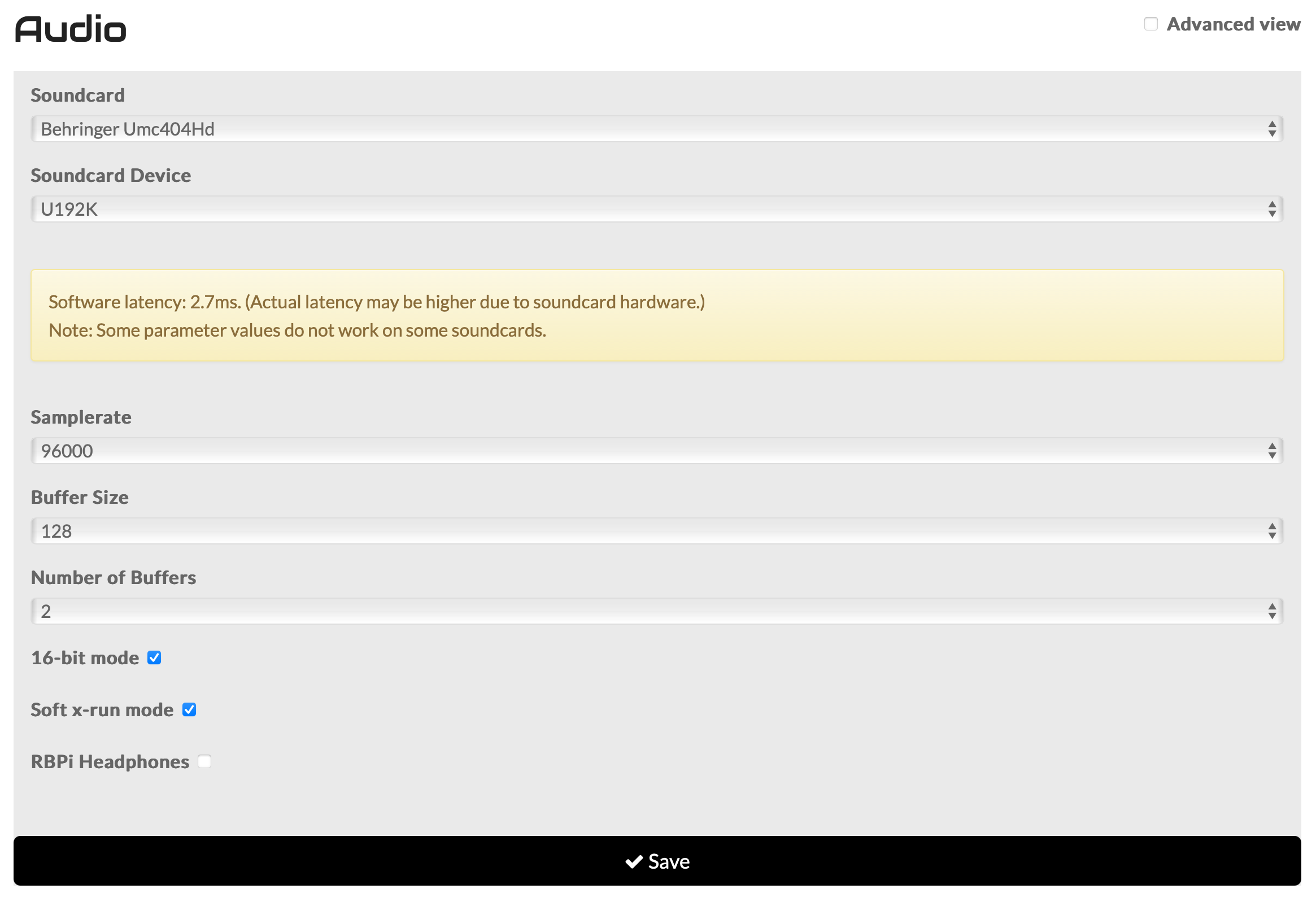
  3. Do I need to switch to a RBpi 5 for my vocal processing Zynthian? These are the settings that give me the least latency while outputting usable audio, but they still give me occasional processor overload pops.
    2.7 ms is the most latency I can get without making me unable to sing, even 4 ms messes me up.

1 Like

I’ve updated the diagram — I hope I understood everything correctly.

NIDI routing layer

Keyboard 37k  ───┐
Presonus Atom  ──┼─> Zynthian A 
Nektar Pacer  ───┤      ↑
B. X Touch mini ─┘      │                 
   				     	↓
                 USB - MIDI convertor
                        ↑
   	    				↓
                    Zynthian B 
                     │  │
RC-505 mk2   <───────┘  │
                        │
Valeton GP-5   <────────┘

Audio routing
IN to Zynthian B

Mic 1 ─────────┐
Mic 2 ─────────┼─> UMC404HD IN1–IN4 -> Zynthian B 
Valeton GP-5 ──┤
Zynth A L OUT ─┘


Out from Zynthian B

Zynthian B L OUT ───> RC-505 AUDIO IN - Loops - RC-505 AUDIO OUT ─────┐
UMC404HD Main OUT ↑                                                   │    
Zynthian B R OUT ─┴───────────────────────────────────────────────────┴──> Speaker

1) Keyboard on a single MIDI channel + switching the chain you control via a MIDI command

This will be a combination of:

  1. setting the input mode for the keyboard (Active mode vs. Multitimbral mode — What exact keyboard model you’re using?), and
  2. sending MIDI notes on the “MIDI Master Channel” to control the UI (selecting the active channel / chain).

Switching the active channel in Mixer view

When Zynthian is in Mixer view, you can select the active channel via Master Key Actions (MIDI notes sent on the MIDI Master Channel):

  • note 52 = ARROW_RIGHT
  • note 53 = ARROW_LEFT

You can configure this in Webconf → Interface → MIDI Options, at the very bottom in the Master Key Actions section.
(My example is based on the default settings.)

Documentation links

Practical note for your setup (assumption)

In your case it could be like this:

  • set the keyboard MIDI IN to Active mode for whatever you want to play from the keys,
  • and disable Presonus Atom on those channels (so note/control messages don’t collide).

2) Powering a fan directly from GPIO

I don’t have hands-on experience with connecting a fan “directly” to the RPi pins, so I’d rather not give advice that could cause power/stability issues.


3) Latency and CPU overload pops/clicks

I’m not an expert at tuning the audio system, but one thing stands out:

If you’re running 98 kHz sample rate, that will put a heavy load on the whole JACK system.

For example, for Pianoteq on RPi4 Zynthians it was recommended to use a much lower rate (people mentioned around 32 kHz) to keep things stable.

Try whether something like this works for you:

  • Sample rate: 48 000
  • Buffer size: 64
  • Number of buffers: 2

If that’s more stable while keeping latency acceptable, it’s often a better compromise than pushing the sample rate extremely high.

1 Like