If this is still on I would be thrilled to join and watch. Will there be a link or an invite?
I am in for it. How soon I’ll be able to join depends on the sleepiness of my offspring.
If I am not mistaken, the (unwritten?) rules of zynthclub dictate you ask riban for the link in a PM.
1 Like
DM me for a link. I can’t attend on Tuesday or Wednesday because I am away for a few days with work.
That’s a go then, we are at least three with some SL interest 
1 Like
I should be able to make it.
I’m on holiday.
Isn’t it normally called gardening leave?
I’m awfully sorrow, but i have to bail out. Must leave home for a couple of days to free a big catamaran from some ice…
Keep on tomorrow, and/or a new date next week or something?
Regards!
2 Likes
How about moving it to Tuesday 2026-03-03 at 19:00 UTC?
I’m in
Impossible for me. How about Wednesday 2026-03-04 at 19:00 UTC?
I’m looking increasingly doubtful for tonight.
I would also recommend we try to involve @riban & @Baggypants in this.
We can certainly do some analysis and experimentation without them involved, and I’m sure it would be beneficial, but their involvement will make the process considerably more efficient.
I think “baggy” may be doing the heavy lifting in that statement! It sounds like most can’t make tonight so let’s postpone to next Wednesday when more may be available.
I, chiefly, felt sorry for you, in all honesty . . .
1 Like
Sounds good to me.
same here
Just to bounce this back up to the top and post a link to @Baggypants video…
Which I have to find first. . .
Here’s the thread it was in . . . .
This one…
It’s good when it joins up like that.
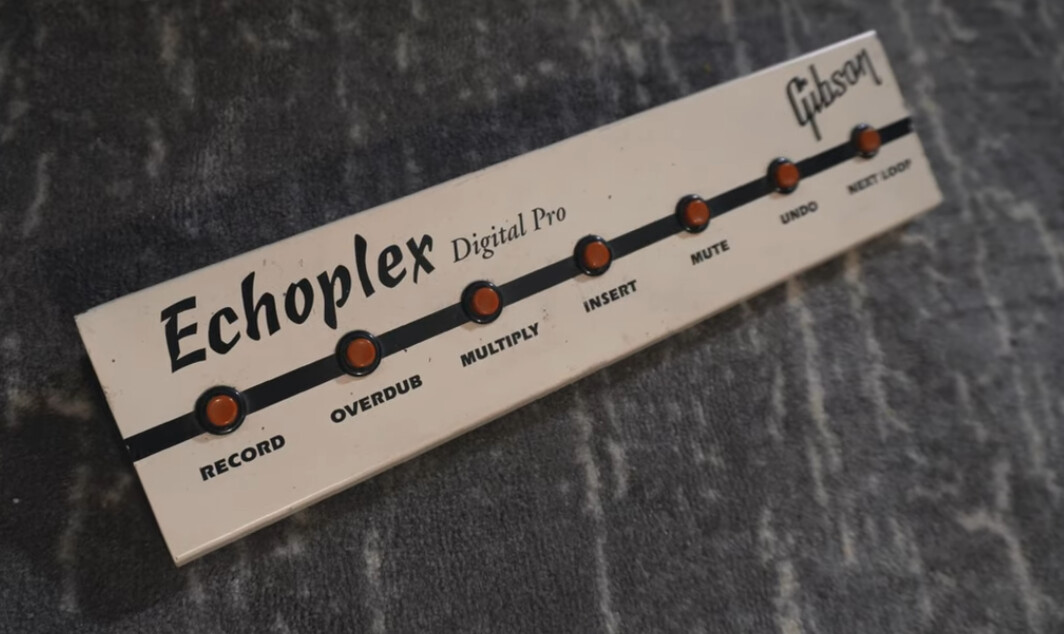
The original sooperlooper was based on Echoplex Digital Pro & this is it’s footswitch.
Infuriatingly 7 buttons ( I have a six button footbox)
RECORD
Start here. If the record threshold is all the way down, pressing it once will start recording and pressing again will end the recording.
If the Threshold is set higher the loop recording doesn’t start until the audio data is greater than the threshold. When finishing the loop, the threshold value is ignored. See the tips in the EDP manual, it works best if you stop and start recording the moment you hit the downbeat, not before. Trust them.
Special Endings
-
If you end a RECORD with another function (OVERDUB, MULTIPLY, REPLACE, SUBSTITUTE, INSERT, ONCE) it will finish the loop immediately (threshold ignored) and start doing the new function.
-
Ending with REVERSE stops recording and plays the loop backwards once then goes into MUTE mode.
OVERDUB
This keeps playing the loop and adds whatever you play on top until you stop overdubbing. Very useful… this is the main tool. The Feedback controls the amount of the original loop that is used every pass. In actuality, when Feedback is set to 100%, it uses a slightly less amount to help prevent clipping on output.
MULTIPLY
This similar to overdub, except the original loop is repeated underneath you “multiplying” the loop length until you stop it. Thus it can turn a 1 measure loop into a 2,3, etc measure loop. QuantizeMode and RoundMode affect how the overdubbing starts and stops. QuantizeMode affects when the operation begins, and RoundMode affects if the new audio continues to be added throughthe end of the current cycle after hitting the final record.
Keep in mind that the original loop length is a “cycle” and the loop length will be a multiple of that. You can actually make an already multiplied loop have fewer cycles when using Multiply on loops that have already been multiplied.
Special Endings
-
If you end a MULTIPLY with a RECORD press it ends the loop immediately and resets the cycle length to the whole loop.
-
The MultiIncrease function is implemented which allows you to increment the cycle count ahead of time, without needing to wait until the exact time to finish the multiply. Basically, press Multiply as if you were finishing it, then before the current cycle plays out, press Multiply again repeatedly to add cycles. The multiply will resume and automatically go into playback after the specified number of cycles.
INSERT
It inserts new input in place, but always one “cycle” length… QuantizeMode and RoundMode have effects similar to Multiply.
Special Endings
Ending with a RECORD press it ends the operation immediately and resets the cycle length to the whole loop.
MUTE
Press to mute loop output. Dry passthough audio will be unaffected. To continue playing the loop in time press MUTE again. To continue playing the loop from the top press TRIG. To play back the loop once and return to mute, press ONCE.
UNDO
Restores the playing loop to the state before the last operation. It maintains the current time position if the current loop was based on the previous loop (eg, not newly recorded). You can go all the way back to the first one still intact within the loop memory. As more operations are done, more of the available loop memory is used, and it will eventually start reclaiming the oldest versions.
Note that to undo all existing state, do a long-press of Undo.
Pressing Undo when an operation is waiting for sync or quantization will cancel the pending operation.
NEXT LOOP
[g.ctrl] select_next_loop
Select the loop after the currently selected one. When it reaches the last it loops back to the first.
And here’s a relevant post on another more or less relevant bit of Zynthian sooperlooper interaction.
2 Likes
There was a Synthclub yesterday of which i’m sure there will be a recount on the Synthclub thread.
Here is a follow up in regards to SooperLooper:
Short video learning pills are to be made.
There was a sort of agreement(?) that one could consider 4 paths in SL to go down:
- Start with recording a loop, the old school looper operator (you) precision in regards to timing the record on/off skill is needed
- Start with a pre-made drum loop (wav) on loop 1 and use that for timing base (“sync to” LOOP1)
- Start with a sequence (could be empty) or metronome and record your first loop (“sync to” HOST), after that do as in number 2
- Keep “sync to” HOST during the whole looping process (“playback sync” ON). This keeps you in time with ZynClock and you can run MIDI patterns (or CLIPPY chains) in your synseq together with your loops
It is my opinion that focus should be on number 2 and 3 for the start of this tutorial process. Number one is sort of old school and difficult to master and number 4 is complex and does perhaps not represent a very common user scenario.
There are a couple of questions that turns up in my head:
- Where to put the SL processor? I now put it on it’s own mixbus chain and chooses which other chain(s) that outputs to the SL chain. Others like it on the main chain
- This question is interlaced with #1 i think: Are you a(n) mutitimbral or active chain kind of person, and (how) does this make a difference
- I’m on Vangelis - that could be a thing. But at some time everyone will be there i guess.
I would like to try and make 2-3 videos that starts down path 3 mentioned above (that is the path i’m most familiar with), SL on a mixbus chain, 2 instrument chains, one audio chain, four loops total.
- setting up the mixbus chain and recording the “beat loop” - with some overdubbing
- adding three more loops
- showing some of the the most basic functionalities (unsure about exactly what)
I might find the time for the first vid today but i doubt it (then maybe next week). If anyone has anything to add, offer, comment, disagree on or whatever, you are very welcome!
3 Likes
Personally I put looper in a chain on it’s own, but I think that’s more to do with an older limitation on Oram that I don’t think is relevant anymore. Then I have other zynth chains set up as multi-timbrel mode and change the midi output channel on the keyboard.
edit: I think it was related to being able to control which midi channel SL responded on.
For people starting looping (scenario 1) I think the most important thing to remember is to finish the recording at the start at the following bar. e.g. If you’re going to record a single bar patterns with 4 beats in a bar, you count ‘(record)-2-3-4-(stop)’. I think this feels weirdly unintuitive if you’ve not done looping before.
I also use the second scenario a lot. It’s especially helpful that Zynthian save loops in snapshots, this means I can have a couple of beats, and a whole second chord progression pre-setup, and then unmute them three minutes into a piece to give a bit of musical freshness without having to spend the time deconstructing the work and building it up from scratch. Also helps to have something to fall back to if you’ve made a mess of the first couple of minutes and wasted time re-overdubbing dud loops.
Another tip is to be careful of effects processors on the output stage. I once did a gig though a desk that had an inline digital effects processor, and it added just enough latency to make the timing of the loop recording impossible. Fortunately we were able to work around it.
2 Likes
I’l give that a try.
ONce I get my footswitch worknig… Grrrrrr!!