Try 
After compiling, you can test encoders and buttons with:
/zynthian/zyncoder/build/zyncoder_test
Regards
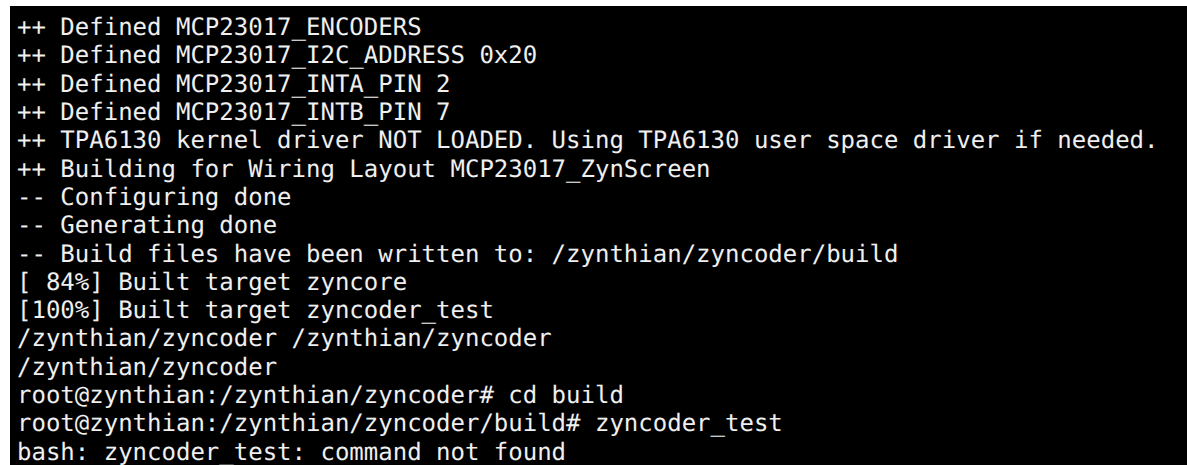
You must run:
./zyncoder_test
from the build directory.
Regards,
root@zynthian://zynthian# cd /zynthian/zyncoder
root@zynthian:/zynthian/zyncoder# cd build
root@zynthian:/zynthian/zyncoder/build# ./zyncoder_test
Starting ZynCore...
ZynCore: Configured 8 x Logical Zynswitches...
wiringPi: ERROR: /dev/gpiochip0 open ret=-1
wiringPi: ERROR: /dev/gpiochip4 open ret=-1
ZynCore->setup_zynmcp23017(0, ...): Can't interrupt callback for INTA pin 27
ZynCore: Setting-up 8 x Physical Zynswitches...
ZynCore: Setting-up 4 x Zynpots (zyncoders)...
Testing switches & rotaries...
and no progress after Testing switches & rotaries...
Did you try to move your knobs and push your buttons after running the test program?
Have you stopped the zynthian UI:
systemctl stop zynthian
If this doesn’t work, I would consider burning a fresh image
Regards
Yes but no reactions from Zynthian
In Oram, when viewing CC controls and I move the control (like sustain pedal), I see the value change in the UI. In Vangelis, this doesn’t happen: the UI doesn’t change.
I saw this using sfizz, with any sampleset.
Maybe this is only for sfizz, and maybe it never worked for sfizz? I don’t see this problem with other plugins.
Update: I no longer see this issue.
Just FYI: upgrading just now to latest Vangelis:
Get:32 https://www.deb-multimedia.org bookworm/main Translation-en [86.2 kB]
Fetched 2,519 kB in 7s (336 kB/s)
Reading package lists…
Reading package lists…
Building dependency tree…
Reading state information…
E: Unable to locate package libmimalloc3
Error Catched! Aborting Zynthian Update …
Updating zynthian-data…
Updated 2 paths from the index
From github.com:zynthian/zynthian-data
27367e7d..6abd898e vangelis → origin/vangelis
and later
Regenerating engines DB: engines …
error: failed to open file /zynthian/zynthian-plugins/lv2/ir/manifest.ttl (No such file or directory)
lilv_world_load_file(): error: Error loading file `file:///zynthian/zynthian-plugins/lv2/ir/manifest.ttl’
lilv_world_load_bundle(): error: Error reading file:///zynthian/zynthian-plugins/lv2/ir/manifest.ttl
INFO:root:Command took 15s
Hi @jlearman ,
Better results will be with this version of Vangelis
Last image has name 2026-08-22-zynthianos-vangelis-2608-beta.img.xz now. Will be change in the time…
1 Like
Hi @jlearman !
I’m reading “bookworm” in the first screenshot.
Bookworm is not supported anymore in Vangelis.
Please, don’t try to upgrade from Oram to Vangelis. And don’t try to update bookworm based Vangelis images.
Downloading and installing the Beta Vangelis image, based in Trixie, is mandatory if you want to use Vangelis. Only Trixie is supported now.
Thanks.
2 Likes
I have two requests/suggestions of improvement:
-
recorder icon: should be updated to Player/Recorder [done]
-
midi player submenu: show also MIDI user folders as designed for audio files
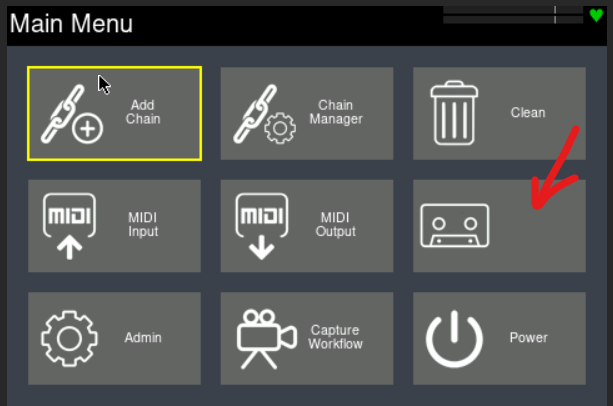
Furthermore: short-clicking on a MIDI file it does not play. Bug? [Fixed]
I created a new SD with Vangelis, but now I’m screwed because networking does not work.
Earlier, Wifi stopped working – not sure why but must be hardware because it also fails on an older SD with non-zynthian Debian Trixie 1.4. Works at first after boot but then fails and won’t reconnect.
So I connected wired Ethernet to Windows and that was working with Vangelis/Bookworm, but doesn’t work with Vangelis/Trixie, not sure why.
I assigned fixed IP addresses and it works now, but wanted to let you know that something might be broken. (In addition to my RPI’s wifi!)
[PS]
Aha, wifi problem was due to default wifi power saving, and once I disabled that, Wifi works fine. I disabled it this way:
/etc/NetworkManager/conf.d/wifi-powersave-off.conf:
[connection]
wifi.power_save = 2
LMK if there’s a better way.
Does this mean you connected directly to a Windows machine and not via a router that works deliver IP address via DHCH? If so this sounds like a mDNS issue. Windows is notorious poor at this and it’s behaviour changes on a whim. Sometimes it works and others not. I never tried Windows to provide mDNS resolution. If forced to use this I would get the assigned IP address from zynthian’s admin menu and use that rather than hostname.
WiFi may be related to location. There is configuration that limits type in different parts of the world.
1 Like
Correct: I can’t get a cable from my office to the router on another floor.
Instead I configured Windows to do network sharing on the wired Ethernet port and connected it directly to Zynthian. This worked earlier, using DHCP.
I added a PS above with my wifi fix.
Hi folks,
I am reporting that on the current Vangelis Beta release (updated) the system runs in a segfault (1) error, whenever the audio recorder of the internally generated audio is stopped. The behaviour happens irrespectively of writing to the internal SD or an USB media.
Shortly after Zynthian reloads the current snapshot, and there seem not to be related artifacts in the exported audio file.
I wonder if anyone else noticed it, and if it’s worth raising an issue ticket.
Regards
I am seeing no segfaults when starting and stopping the audio recorder from the V5 onscreen button overlay record button. Please raise a github ticket via webconf so that we can trace the issue. Include full procedure to reproduce.
OK, here’s the most trivial bug report ever.
I have a snapshot where, on the MIX screen, one chain is to the far right of the screen, just left of the main mixer. When I first start Zynthian, it appears to the right of the otherwise rightmost chain, rather than just to the left of Main. If I go to any other screen and back to MIX, it’s back where it belongs.
Not at all important to me, but indicates that we have two ways of showing the MIX screen, and that there might be other differences lurking that could cause bugs.
LMK if I should open an issue.
BTW, this didn’t happen until fairly recently, say, in the last week or so. I don’t think it happened before I moved to Trixie from Bookworm (though I doubt it’s OS-related.) I did that 3 days ago, but no idea how long before that I last updated. I do update fairly often, though, whenever something doesn’t seem to be working (and the issues usually do go away.)
If you have pinned a chain and it is not always showing as pinned, or you have not pinned a chain and it sometimes shows as pinned, then there is a bug that needs reporting via github issue tracker. Please include the snapshot and explain how to recreate, what the expected and actual behaviours are, etc. I haven’t changed anything in the code relating to pinned chains for over a month but I am not the only one touching the code… .
1 Like