Please Nicolás, could you describe in detail the issues? What is this chaotic behavior?
Thanks
Please Nicolás, could you describe in detail the issues? What is this chaotic behavior?
Thanks
In the project i’m working on all the phrases are set to NEXT with different number of repetitions. When setting some pattern to DISABLED the correct playing sequence is lost. Going from phrase A to B, for example, keeps one or more patterns from A inside B, so the NEXT sequence is played with patterns mixed from different phrases loosing the structure of the song. I could make a video later in the evening but this seems to be the problem.
I think t you are describing expected behaviour. If a sequence is disabled, it will not be launched by the phrase launcher. If it is not launched then it won’t act to stop other sequences in it mutual group. So a looping sequence will not be stopped because nothing has requested it to stop. This is by design and allows you to have a continuing loop in one phrase and launcher another phrase without interrupting it. To stop your other loops you must enable the corresponding sequence and leave it empty if you want silence from that chain.
I improved things (i hope). @Nicolaz , please try now.
Regards,
Maybe, but i’d expect the phrases to play correctly if in a row there are patterns with notes and other disabled (in gray). I think that the engine should consider only active patterns and simply ignore the grey ones.
Thanks, i updated and tested the same project but nothing have changed.
I did a session video where you can see the broken behaviour. Phrases int1 and int2 are played correctly but when going to lin1 i’d only expect to hear C1 and B2 (and C9 but this is active and empty). Instead, you can see that A3 and A6 keeps playing while they should stop. And they keep playing in the following phrases.
Hi @Nicolaz !
You must re-enable all disabled sequences. They will keep grayed if they are empty.
Think of pads as “launchers”. When you start a sequence, it will stop any other sequence playing in the same group. A “disabled” sequence is never started, so it doesn’t stop sequences playing in its group. To get things working as you want, you need to use “empty” sequences, that are different from “disabled” sequences. Empty sequences can be played and stopped normally.
I’ve changed colouring so now empty sequences are shown in light grey, while disabled sequences are shown in dark grey. I hope this improve the workflow and you feel comfortable.
Thanks a lot for testing!
Hi V5 Vangelis testers!
I forgot to explain how to access and use the CC editor. Easy, from pattern editor:
Enjoy!
Hi V5 Vangelis testers (again)!
I did extended the pattern editor ALT mode with copy/paste functionality:
Enjoy!
Hi,
after reports the segfault error might be resolved I found the courage to get back to vangelis to get into this whole new stuff. So I updated my oram staging and went on to vangelis:
Running zynseq/build.sh...
/zynthian/zynthian-ui/zynlibs/zynseq /zynthian/zynthian-ui
/zynthian/zynthian-ui/zynlibs/zynseq/build /zynthian/zynthian-ui/zynlibs/zynseq /zynthian/zynthian-ui
-- Configuring done
-- Generating done
-- Build files have been written to: /zynthian/zynthian-ui/zynlibs/zynseq/build
[ 14%] Building CXX object CMakeFiles/zynseq.dir/zynseq.cpp.o
/zynthian/zynthian-ui/zynlibs/zynseq/zynseq.cpp:39:10: fatal error: nlohmann/json.hpp: No such file or directory
   39 | #include <nlohmann/json.hpp> // provides json
      |          ^~~~~~~~~~~~~~~~~~~
compilation terminated.
make[2]: *** [CMakeFiles/zynseq.dir/build.make:76: CMakeFiles/zynseq.dir/zynseq.cpp.o] Error 1
make[1]: *** [CMakeFiles/Makefile2:83: CMakeFiles/zynseq.dir/all] Error 2
make: *** [Makefile:136: all] Error 2
/zynthian/zynthian-ui/zynlibs/zynseq /zynthian/zynthian-ui
/zynthian/zynthian-ui
❌ zynseq/build.sh failed (exit code 2)
[…]
==============================
⚠️  Overall result: FAILURE
Failed scripts:
  - zynseq/build.sh
==============================
/zynthian/zynthian-ui/zynlibs/zynclippy /zynthian/zynthian-ui
/zynthian/zynthian-ui/zynlibs/zynclippy/build /zynthian/zynthian-ui/zynlibs/zynclippy /zynthian/zynthian-ui
-- Configuring done
-- Generating done
-- Build files have been written to: /zynthian/zynthian-ui/zynlibs/zynclippy/build
[100%] Built target zynclippy
/zynthian/zynthian-ui/zynlibs/zynclippy /zynthian/zynthian-ui
/zynthian/zynthian-ui
/zynthian/zynthian-ui/zynlibs/zynseq /zynthian/zynthian-ui
/zynthian/zynthian-ui/zynlibs/zynseq/build /zynthian/zynthian-ui/zynlibs/zynseq /zynthian/zynthian-ui
-- Configuring done
-- Generating done
-- Build files have been written to: /zynthian/zynthian-ui/zynlibs/zynseq/build
[ 14%] Building CXX object CMakeFiles/zynseq.dir/zynseq.cpp.o
/zynthian/zynthian-ui/zynlibs/zynseq/zynseq.cpp:39:10: fatal error: nlohmann/json.hpp: No such file or directory
   39 | #include <nlohmann/json.hpp> // provides json
      |          ^~~~~~~~~~~~~~~~~~~
compilation terminated.
make[2]: *** [CMakeFiles/zynseq.dir/build.make:76: CMakeFiles/zynseq.dir/zynseq.cpp.o] Error 1
make[1]: *** [CMakeFiles/Makefile2:83: CMakeFiles/zynseq.dir/all] Error 2
make: *** [Makefile:136: all] Error 2
After seeing already in the staging update there was a problem
Err:1 https://www.deb-multimedia.org bookworm/main arm64 vlc arm64 1:3.0.21-dmo0+deb12u1
  404  Not Found [IP: 2607:5300:120:e71::1 443]
Err:2 https://www.deb-multimedia.org bookworm/main arm64 vlc-plugin-jack arm64 1:3.0.21-dmo0+deb12u1
  404  Not Found [IP: 2607:5300:120:e71::1 443]
E: Failed to fetch https://www.deb-multimedia.org/pool/main/v/vlc-dmo/vlc_3.0.21-dmo0%2bdeb12u1_arm64.deb  404  Not Found [IP: 2607:5300:120:e71::1 443]
E: Failed to fetch https://www.deb-multimedia.org/pool/main/v/vlc-dmo/vlc-plugin-jack_3.0.21-dmo0%2bdeb12u1_arm64.deb  404  Not Found [IP: 2607:5300:120:e71::1 443]
E: Unable to fetch some archives, maybe run apt-get update or try with --fix-missing?
Applying patch 20260129.1 ...
I think I fixed this with
sudo apt install --reinstall vlc vlc-plugin-jack
But it seems unrelated, since the compilation error persists.
Any idea what went wrong? If it helps, I started with this version:
 ##########################       ----------------------------------------
#                          #      ZynthianOS Oram-2511-3
#            ##            #      Timestamp: 2025-11-05
#      ##   #  #   ##      #      Built from RaspberryPiOS Bookworm (aarch64)
#     #  #  #  #  #  #     #      ----------------------------------------
###   #  #  #  #  #  #   ###      Kit:           Custom
#  #  #  #  #  #  #  #  #  #      Display:       Generic HDMI/DSI Display
#   ##   #  #  #  #   ##   #      Soundcard:     HifiBerry DAC+ ADC PRO
#         ##    ##         #      Wiring Layout: MCP23017_ENCODERS_V5TOUCH
#                          #      ----------------------------------------
 ##########################
                                  zynthian-ui: oram (37b776)
                                  zynthian-webconf: oram (0e2c25)
                                  zyncoder: oram (ea17c8)
                                  zynthian-sys: oram (ec9de8)
                                  zynthian-data: oram (781d76)
                                  ---------------------------------------
Yes, now it’s ok. Thanks a lot to you.
Hi @hannesmenzel !
Try this on Vangelis:
apt-get -y install nlohmann-json3-dev
And update again.
Regards!
Fantastic, that worked!
Hi @Nicolaz !
I just implemented this:
as a “Clone phrase” option. You simply clone and move the cloned phrase as you need.
Enjoy!
Great! Very usefull and it works well.
Just one thing… while testing i immediately noticed that “Delete phrase” function is not working now.
Fixed!
The new Alt-mode copy paste does not work for me with on-screen buttons (v5 profile). The first f1 switches to orange (flickering) f2-f4 do not change color in pattern editor. And the functions described do not work (as in: nothing happens)
Is this only implemented currently for the wired switches? (Cannot test whether that does work as I have no actual v5).
Hi everybody,
Not sure anymore if this is the right place, to post questions about the Vangelis testing branch in general, or as of now this thread only/mostly concerns the specific Zynbleton coming release.
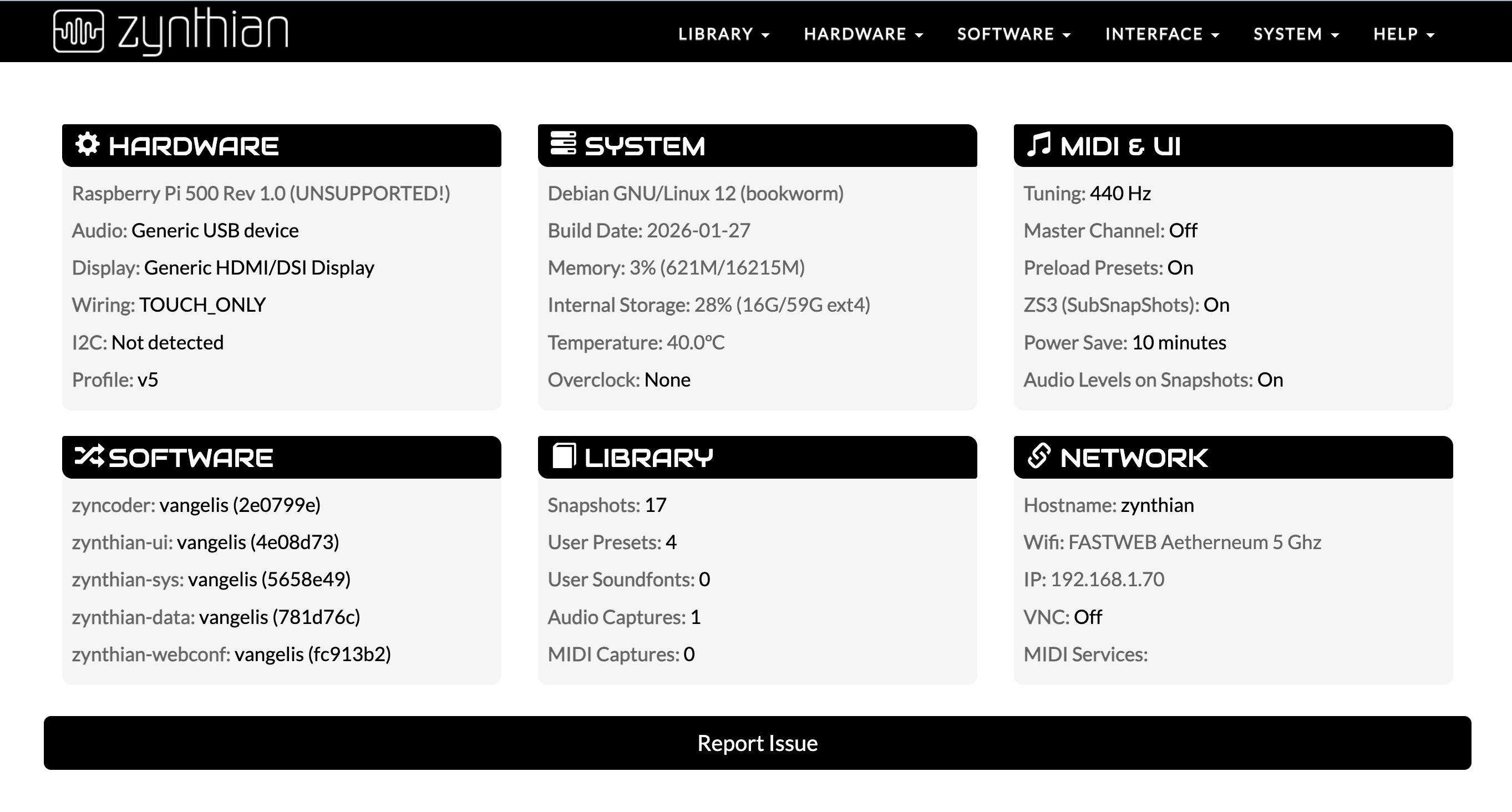
Anyway, I report that on the only Pi5 where I can conveniently test Vangelis - without being forced to open the case to reach the SD holder (an otherwise well working Zynthian installation on a Pi500+ keyboard computer) - it seems not possible to control the GUI as with other custom builds, with a portable HDMI screen + keyboard + mouse.
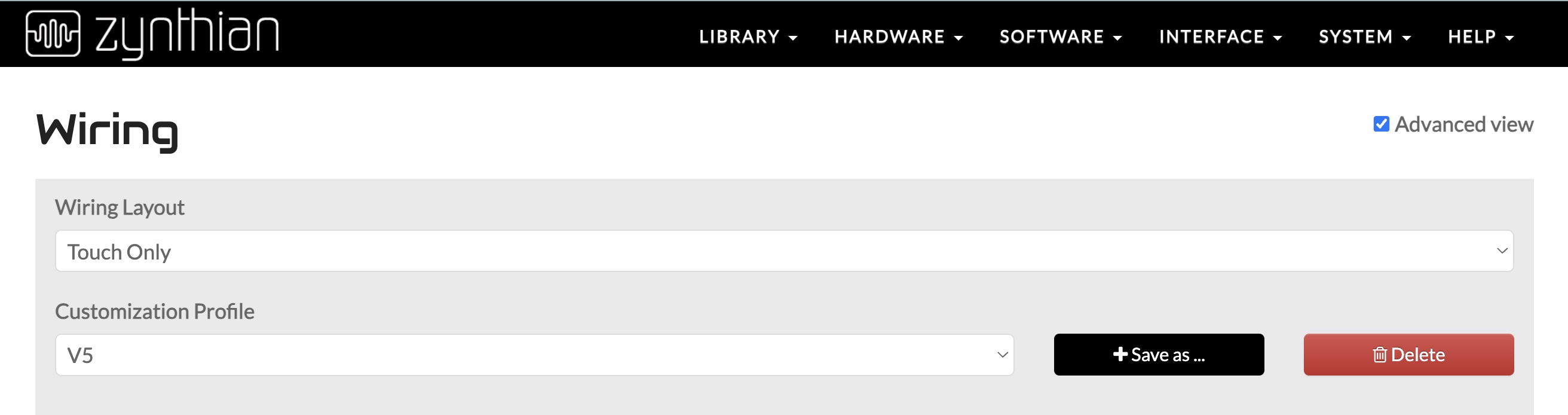
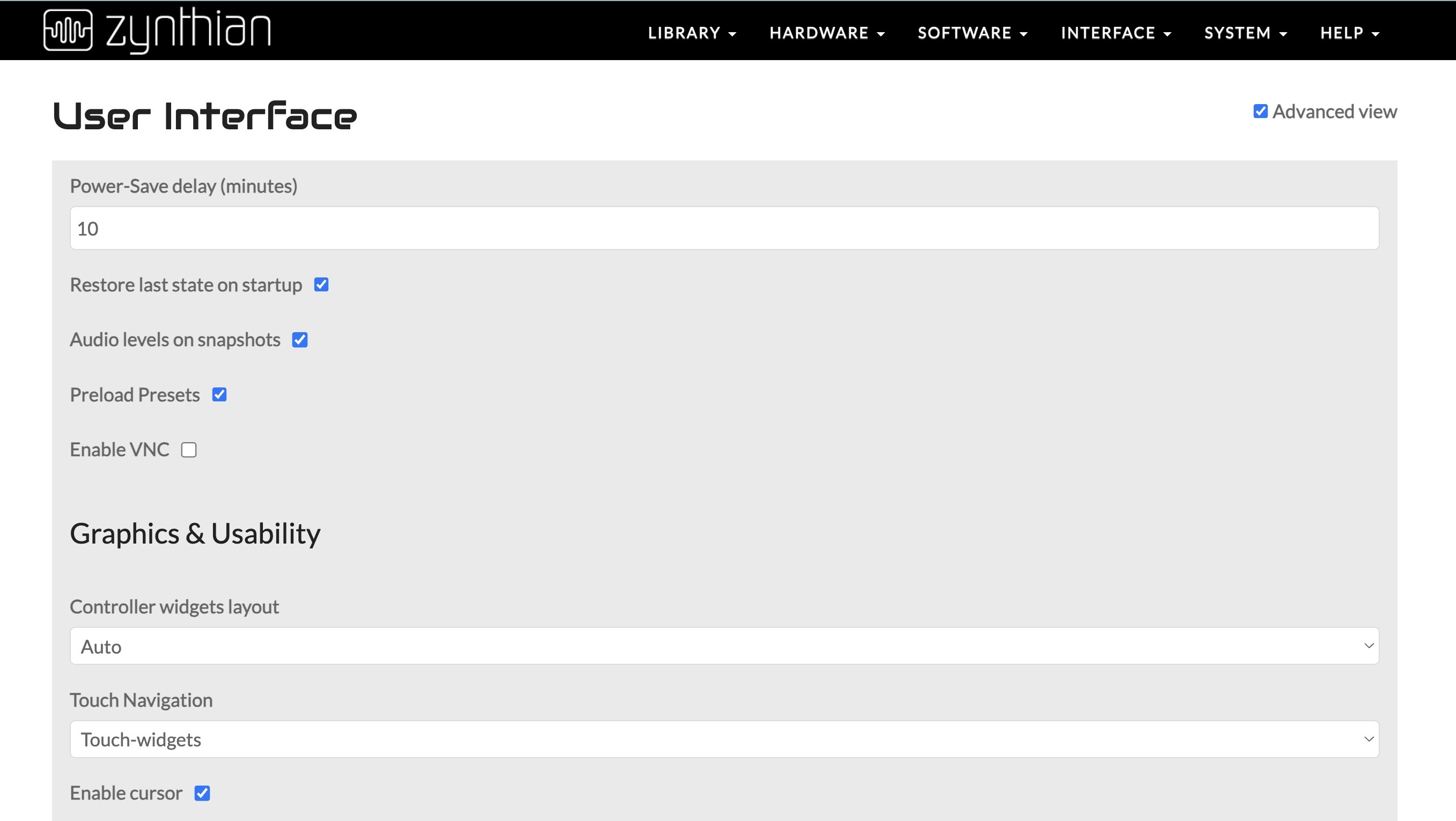
There is no way I can manage to set Vangelis to work with V5 keypad at left and V5 Zynface wiring, that is, with virtual Zynthian keypad buttons on screen, which would be very viable on my large 16" foldable monitor. If I set the system in this fashion on webconf, I get software error on reboot, and must revert to touch widgets with auto layout and V5 standard wiring, for Zynthian to start. However, in this way I don’t achieve any control through mouse and keyboard (no preset key-bindings either), even if I configure keys to call CUIA commands, because the key-binding is lost on reboot.
See my system status and GUI configuration settings in the pictures attached.
I wonder if the Vangelis interface is still conceived to work viably also without the official Zynthian kit. It seems that the graphical layout (huge buttons and text) is less scalable on different hardware setups than in the past.
Am I right or wrong about this impression @jofemodo and @riban? Should I rather test Vangelis only on my manually upgraded V5, in order to experience the actual UX and GUI workflow currently designed?
Regards 
Vangelis is the testing ground for the next release. It should work for all three supported workflows / architectures. It is still fairly early days since the big merge so they’re had been limited testing on various configurations. Do add tickets to the issue tracker for bugs, regressions, etc. We depend on you all for that treating that we cannot do entirely by ourselves.
Is there a way in Vangelis to move all the notes (or selected group of notes) orizontally in a pattern? It seems we can only transpose but not move left-right.
It’s not implemented but it’s planned (in my head).
Regards