It is a parameter of the audio mixer process, with level, balance, etc.
2 Likes
You cold use APC40 driver as a template for the mixer and launcher integration.
A brief user guide.
- In mixer view, OPT button or bold SELECT or click topbar will show the chain manager.
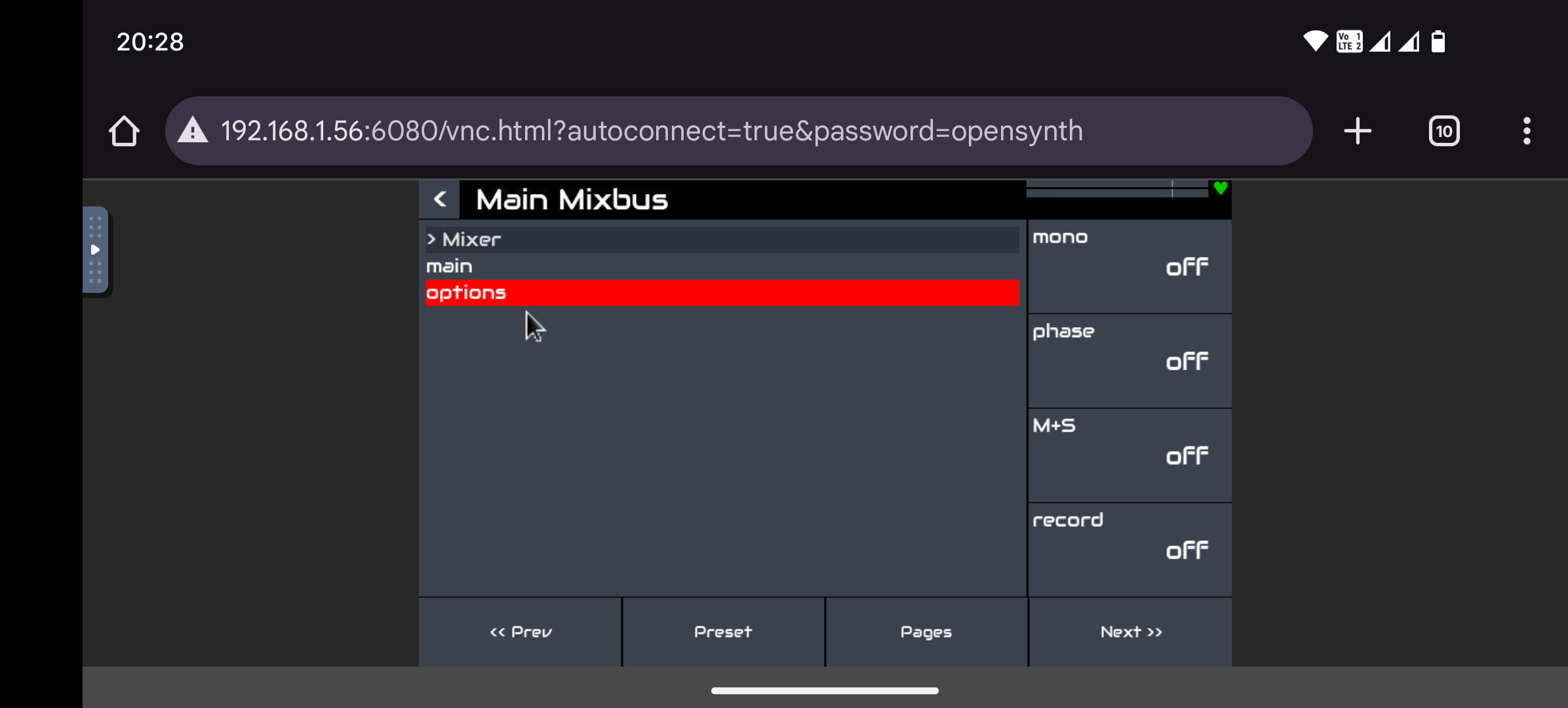
- Mixbus (effects returns) have blue (bottom) legend strip. Main mixbus has dark red.
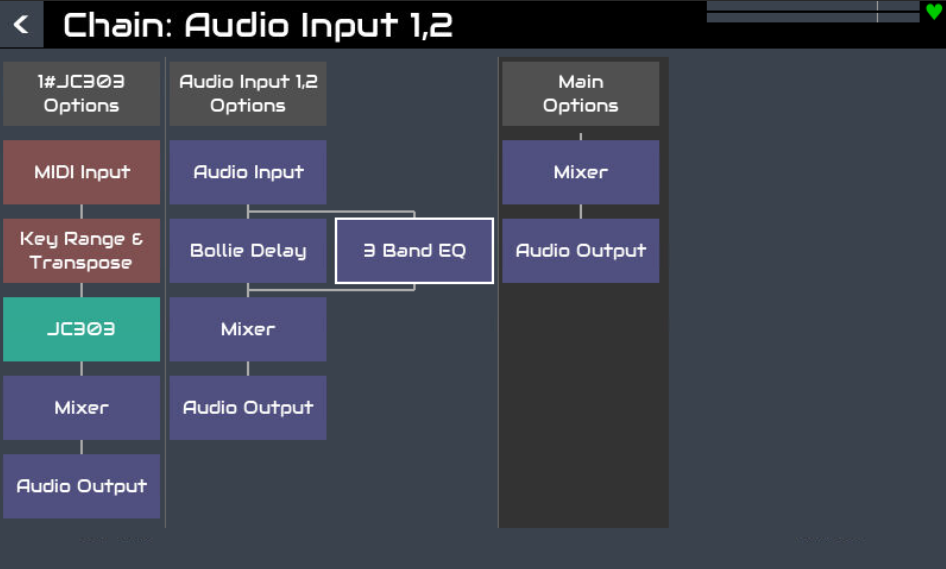
- Cursor buttons and encoders 3 & 4 navigate the selection cursor.
- Select or click a box to show its menu / function.
- Bold select or bold click a processor to move it. (Also an option in its context menu.)
- Processors can be moved up/down the chain to be in series or parallel and pre/post fader. They may be dragged with a mouse (when in move mode).
- Bold select the top (chain) option box (grey) to move the chain.
- Chains can be moved left/right to reorder their position. Dragging to the far right will pin the chain to the right of the mixer. (It shows in the grey background in chain manager view when pinned.)
- Chain options (top grey box) gives operations on the whole chain.
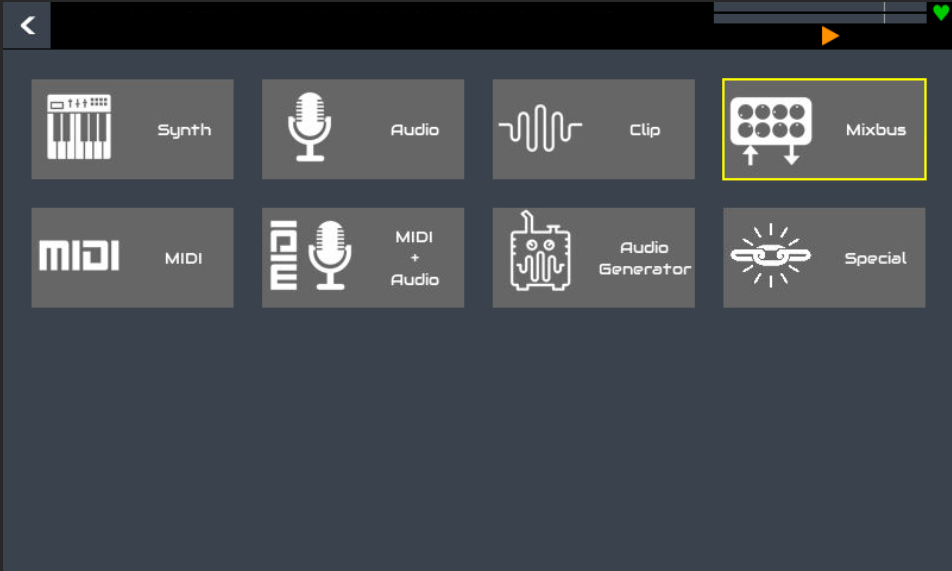
- Adding a processor will insert it immediately before/after the synth if selected from the synth processor menu or in parallel with the processor who’s menu is used to select insert processor.
- A new chain is inserted to the left of the selected chain by using its option menu.
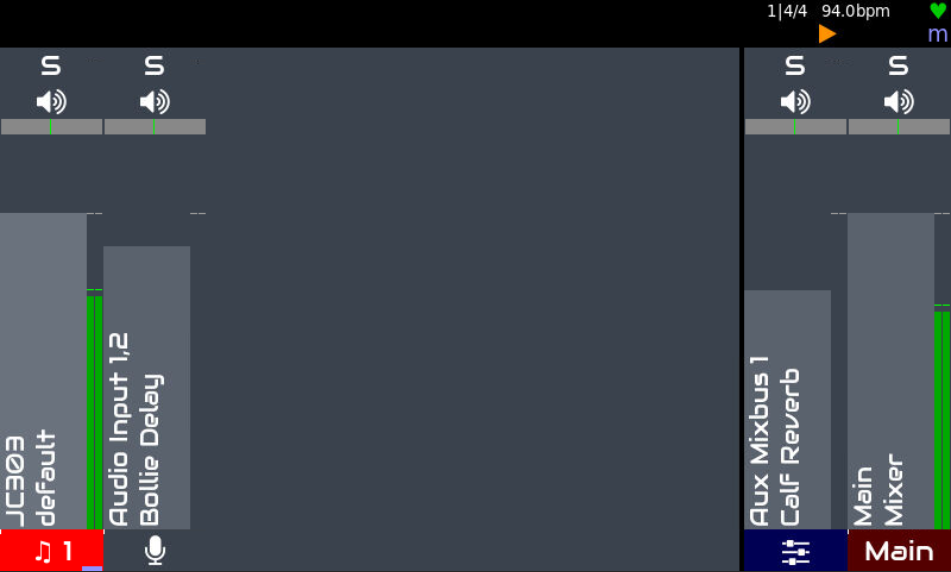
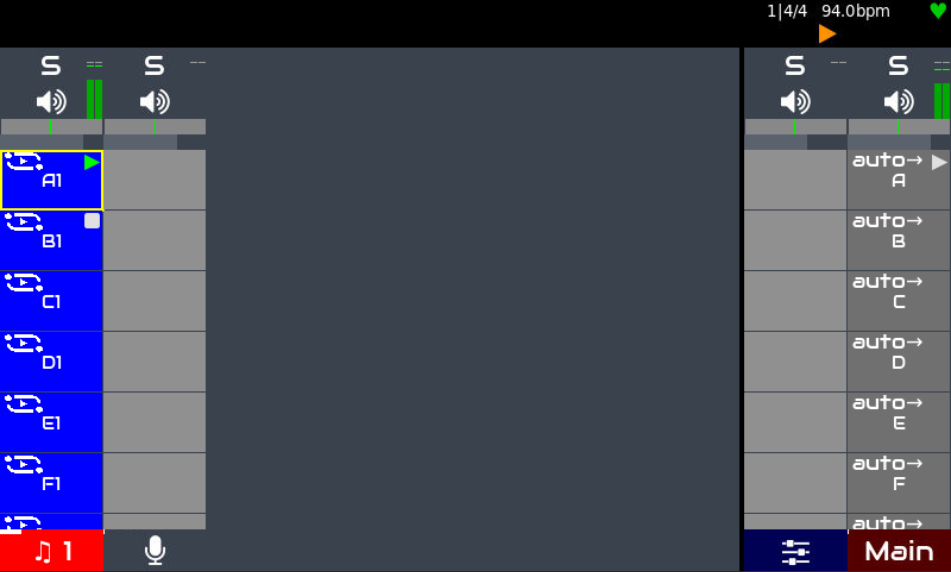
- In mixer view, PAD button or bold SELECT or bold click top bar toggles faders / launchers.
- The meters shrink and move to the top. The fader shrinks, rotates to be horizontal and moves to the top.
- Audio only chains are still shown, with blank launcher buttons which do nothing.
- Launchers on the far right are “phrase launchers” that will start or stop all the sequences in that row.
- SELECT or click a launcher to toggle its play state.
- Bold SELECT or bold click a launcher to edit the pattern or show the phrase launcher menu.
- The pattern editor menu has some sequence options including naming (what appears on the launcher button), play mode (loop, play x times), etc.
- The phrase options menu allows configuration of the phrase launcher including:
- Duration of the phrase (how long before it performs its follow action). By default this is calculated from the longest sequence in the phrase.
- Follow action defines what happens at the end of the phrase, e.g. trigger next phrase.
- Tempo overrides the current tempo when the phrase starts, including if it is triggered by a follow action.
- Beats per bar overrides the time signature when the phrase starts.
- Phrase can be added, removed and moved.
- The mixer processor controls appear in the control view. These include: level, balance, mute, solo, mono, phase, M+S and multitrack record arm.
- There will also be a send page per mixbus (excluding main mixbus) with send level and pre/post fader switch.
- Each audio processor has an additional “bypass” control that will bypass the effect when asserted.
- All control parameters may be bound to MIDI CC using the standard MIDI learn procedure.
- Horizontal scrolling can be done with touch by dragging the bottom legend strips. Vertical scrolling of launchers can be done with touch by dragging the phrase launchers on right hand side. This is to reduce the risk of accidental dragging on the main launchers.
Hopefully this is enough to get you going.
Something I forgot to mention is that the mixer is now split in two, with one part handling input chains and the other handling mixbuses. This allows pre and post fader effects and send / returns to be handled without the additional latency of Oram’s post-fader implementation.
8 Likes
Would it help to pin this topic so it is front and center when people arrive on the Discourse?
This is the result when used:

Ooh, this sounds good. First steps towards an auto-accompaniment system perchance?
This topic was pinned for several days when the announcement of impending change was made. I will pin it again for a couple more days…
1 Like
Here are some tips for control driver authors:
- Chains are now stored in display order - no need to call a separate helper function, just get the list of chains.
- We have lost the concept of a list of just MIDI (launcher) chains. All chains are used and it is up to the user to move them to provide the required presentation in the hardware controller. (Maybe we could consider an enhancement here but we want it to be simple and obvious to the user.)
- Chain id remains arbitrary and should not be used to indicate position, except chain 0 is always the main mixbus.
- There is a “pinned” position that defines which chains are pinned to the right. Main mixbus is always pinned and always farmost right. There are Chain Manager methods to set_pinned(count), get_pinned_count() and get_pinned_pos().
- There are 2 mixers. One for chains (state_manager.zynmixer_chan) and one for mixbuses (state_manager.zynmixer_bus).
- Each chain may contain an audio mixer processor chain.zynmixer_proc. This is a standard zynthian processor that implements all mixer channel strip controllers as normal zctrls.
- There is a Chain method chain.is_audio() that returns True if the chain contains an audio mixer processor.
- The metronome zctrls are now owned by zynseq class so can be accessed without accessing the tempo gui view. You can set / get tempo, metronome enable & metronome volume from state_manager.zynseq object.
- Mixer view has 2 modes that either shows faders or launchers. Broadly this is implemented similar to how zynpad was accessed.
- Hardware launcher LED colours have been adjusted to allow 16 distinct colours that can be matched to APC and Launchpad colours. These are stored in zynthian_gui_config.LAUNCHER_COLOUR structure. This should be extended to provide suitable colours for other controllers, with the aspiration of conformity and consistency.
- Although clip launcher (clippy) chains use MIDI from the sequencer for their triggers, they are not MIDI chains and have a dedicated output from zynseq. They are closer to a generator type engine (no MIDI chain, audio procesor chain) but we present them as first-class citizens, with their own engine type.
- Clippy colours are currently simply the MIDI channel colours in reverse order. I would like to see if we could find more distinct colours, but this is a challenge. We may reconsider use of colours because the choice is limited and needs to work with various modes. This is a subject we should discuss further.
- We have added the concept of horizontal and vertical scrolling of chains and launchers in the device controllers. (I am still working on this - the current plan is to lock it to zyngui display, i.e. top left launcher is the same in zyngui and hardware controller.)
- Added a phrase_launcher_col which is actually the same as main column - so maybe there should be some consolidation.
- With the simplication of ordered, contiguous chains, the code around columns has been simplified or removed.
- zynthian_ctrldev_zynmixer has references: self.zynmixer and self.zynmixer_bus that point to the chain and mixbus mixer engines respectively. (Maybe we should use the underscore prefix convention more - I have started to do this a little, but not retro-fitted.)
- self.mixer_col_offset probably is / should be the same as self.scroll_h. We should consolidate this, using self.scroll_h and these should probably be moved to the base class.
- Helper functions get_mixer_param, set_mixer_param & toggle_mixer_param allow access to the mixer strip based on its position.
- We want to abstract the sequencer code from @oscaracena’s drivers to a class, similar to how we have mixer and launcher (zynpad) classes.
- We may also want to abstract GUI control to another class.
- APC40 is currently the most feature rich / complete implementation of mixer, launcher and GUI control and feedback. Both @jofemodo and I have this hardware (which is a very good fit for zynthian integration) and will use it as the benchmark for driver integration. We should ensure its implementation is the gold standard and follows best practice.
6 Likes
Thanks for the pointers. I will tread through the snow to get a new SD card for playing.
Considering the wish to abstract the sequencer part of Oscar’s drivers, what’d be the best order of action? Do you want to abstract it and use it in the APC40 driver? Shall we wait for this before dirtying our hands on APC25key?
Is there another device that you also have which could already be migrated? This might provide the proverbial picture saying more than a thousand words when migrating other drivers.
1 Like
I also have an Launchkey Mini MK3 which I use for Novation type integration. It is a bit odd in having 8 pots and only 2 rows of launcher pads. This is mostly working but I need to revisit to ensure it is using the template correctly.
It would be nice to abstract the sequencer integration and add to APC40. (I initially tried to refactor the APC25 code but there were too many changes required.) I would love to have that workflow… but I need to better understand it. I am happy for someone else to do that abstraction. It doesn’t have to go into the APC40 driver first. It would be good if the abstraction occurs so that we could add it to any other device more easily. The concept of abstraction is that there are core functions, like triggering sequences and updating play state and there are custom implementations like how to map launcher buttons and drive LEDs when a state is reported.
Driver integration is a side-task that I did for APC40 (and modified Launchkey) because I have a new one that I wanted to play with. (Thanks Santa!) My core effort has been on the main code changes around launchers, clips, mixer, etc. And I have to pay the bills, which none of this does!
[Edit] Please feel free to add tickets to the issue tracker for bugs and features in Vangelis. We love you alpha tester people. 
1 Like
Regarding chain list and chain filtering in ctrldev drivers:
Well, indeed we have a better way for getting this now. The ctrldev_base class now implements a chain filter that you can configure in the constructor with:
# List of chain types to include (empty for all) => ["midi", "audio", "synth", "generator"]
self.chain_type_filter = []
Currently, only “OR” filtering is implemented (union). Having “AND” filtering (intersection) and combination of both would be better, but not a priority.
The base code class will take care of keeping the filtered chain list ready and updated for using by the driver:
self.chain_ids_filtered = []
There are a few related functions too:
def get_filtered_chain_id_by_index(self, index):
  """Get filtered chain ID by index

  index - Index in filtered chain list
  return: integer
  """

  try:
      return self.chain_ids_filtered[index]
  except:
      return None

def get_filtered_chain_by_index(self, index):
  """Get filtered chain by index

  index - Index in filtered chain list
  return: chain
  """

  try:
      return self.chain_manager.chains[self.chain_ids_filtered[index]]
  except:
      return None

def get_filtered_index_by_chain(self, chain):
  """Get index of chain in the filtered chain list

  chain - chain to find in filtered list
  return: integer
  """
  try:
      return self.chain_ids_filtered.index(chain.chain_id)
  except:
      return -1

def get_filtered_index_by_chain_id(self, chain_id):
  """Get index of chain in the filtered chain list

  chain - chain to find in filtered list
  return: integer
  """
  try:
      return self.chain_ids_filtered.index(chain_id)
  except:
      return -1

def get_filtered_midi_chan_by_index(self, index):
  """Get filtered chain MIDI channel by index"""
  try:
      return self.chain_manager.chains[self.chain_ids_filtered[index]].midi_chan
  except:
      return None
You can see how all this is used in the ctrldev_zynmixer base class. If you want a more complete (and complex) example, you can check the mackiecontrol driver, that now allows to filter chains using the specific buttons that some devices have.
Regards!
Just started with a fresh image or Oram, updated to Vangelis.
Sadly first thing I try gives error
- Insert new chain
- MIDI
- Midi tool: None (default)
- Midi channel 1 (default)
- ERROR CVIA zynswitch: (27, ‘S’)
What’s happening?
Same after reboot, with adding instrument chain, etc..
EDIT: same procedure works without error when started from the preset snapshots
Zynthian V5
zyncoder: vangelis (fc18647)
zynthian-ui: vangelis (3c507f8)
zynthian-sys: vangelis (d47f403)
zynthian-data: vangelis (e4e24b8)
zynthian-webconf: vangelis (0e2c255)
Logged similar error with V4 kit
Issue: Add instrument chain results in ERROR CUIA ZYNSWITCH: (3, ‘S’) · Issue #1540 · zynthian/zynthian-issue-tracking
Updated the issue with partial workaround
Admin - Visible chains showed (0) as value.
After changing to the minimum value of 4 and removing all existing chains, I can now add new chains/instruments.
and new findings, issues on shutdown.
This should be resolved. Please update and retest.
1 Like
I’m testing Zynbleton and after some moments of disorientation i must say that the new interface is much more powerfull. This is definitely a great improvement. I miss a bit the big rectangles and the old colors of Zynpad but in my opinion a big problem is the partial overlapping of symbols and characters. Also, i like Audiowide but it’s not the most readable font. I know i’m nitpicking but in my 55 age i must balance between myopia and presbyopia, and it’s not easy 
It would be great if we could select colors and font, maybe. Just to make some experiment to improve the view.
3 Likes
I would like to see a theme mechanism to allow users to select from some proven templates. Regarding the change of colours, these have been chosen to align with the colours snails on the Novation and Akai hardware controllers, which the do quite well.
1 Like
Finally its there!!! The BYPASS switch per lv2 effect in the Zynthian UI!!!
THANKS!!!
And… I see now… the possibility to move (on the screen) via grafical interface and mouse/keyboard pluging around… also make parallel branches!!!
(Did not test it yet… :-))
Wonderful!!! 

Cheers,
Maarten
2 Likes
This functionality has not changed. You can put processors in parallel in a chain like you could before. The graphical display makes the chain layout more obvious.
BTW you can move processors up and down the chain, but can also move them to other chains, so if you have the perfect delay but in the wrong chain, you could move it to the right chain or to a mixbus chain to turn an individual chain’s effect to a globally available send/return effect.
2 Likes
Hi @Riban…
I love that all can be done now ‘grafically’ via a clear interface!! 
And indeed… I was really surprised that one can move the plugins to another chain.
I am really incredibally enthousiastic!! WOW!!
Thanks and cheers,
Maarten
3 Likes
I’m also really happy with the graphical layout!
I have one question regarding Clippy:I read in another thread where plans for clippy was discussed, and i wonder if my installation is reflecting the current development state of Clippy or maybe i miss something on my machine. When i make a Clippy chain, the only initial action for me to do is to choose path for audio file, then of course there are more options to control the file. Have i missed an opportunity to record an audio file direct from the clippy chain in launcher (with preset length)? Or is it not implemented, and if so, are there still plans in that direction?
I’m totally happy with the development, grateful, and as always really impressed with the achievements of the Zynthian developers!
1 Like