PS: For the sake of further clarity, I can fully control the cursor movement with the pointer, and can see a graphical representation of the on-screen buttons’ depression with the mouse left button, but the action does not trigger the related function of the virtual keypad.
I did some deep debugging with substantial (and, I must say, impressive) help from Claude, and apparently discovered that the multitouch.py driver looks for a capacitive touchscreen with ABS_MT_SLOT, but without a physical touchscreen cb_touch always returns “break” ignoring all clicks.
Thus, it may seem that the current general-purpose touch+hdmi Vangelis implementation of the non-V5 kit GUI fails to negotiate the pointer clicks like the corresponding tactile actions on a touchscreen. This happens equally with touch navigation set to “none” and to “V5 keypad on left”.
The LLM has provided some accurate data with a plausible prognosis… but of course is not entirely correct or relevant. You have reported that when you use your mouse to click on a button, the button responds to the mouse click with a visual representation of a change of state. (I am glad I implemented the (subtle) press and release gui indication.) Claude has not referenced this fact, i.e. that the human-machine interface (mouse button to application) is working fine. (BTW we no longer use gui toolkit buttons but instead implement the gui button state manually which is further proof that the application (not just the gui layer) is processing the click.)
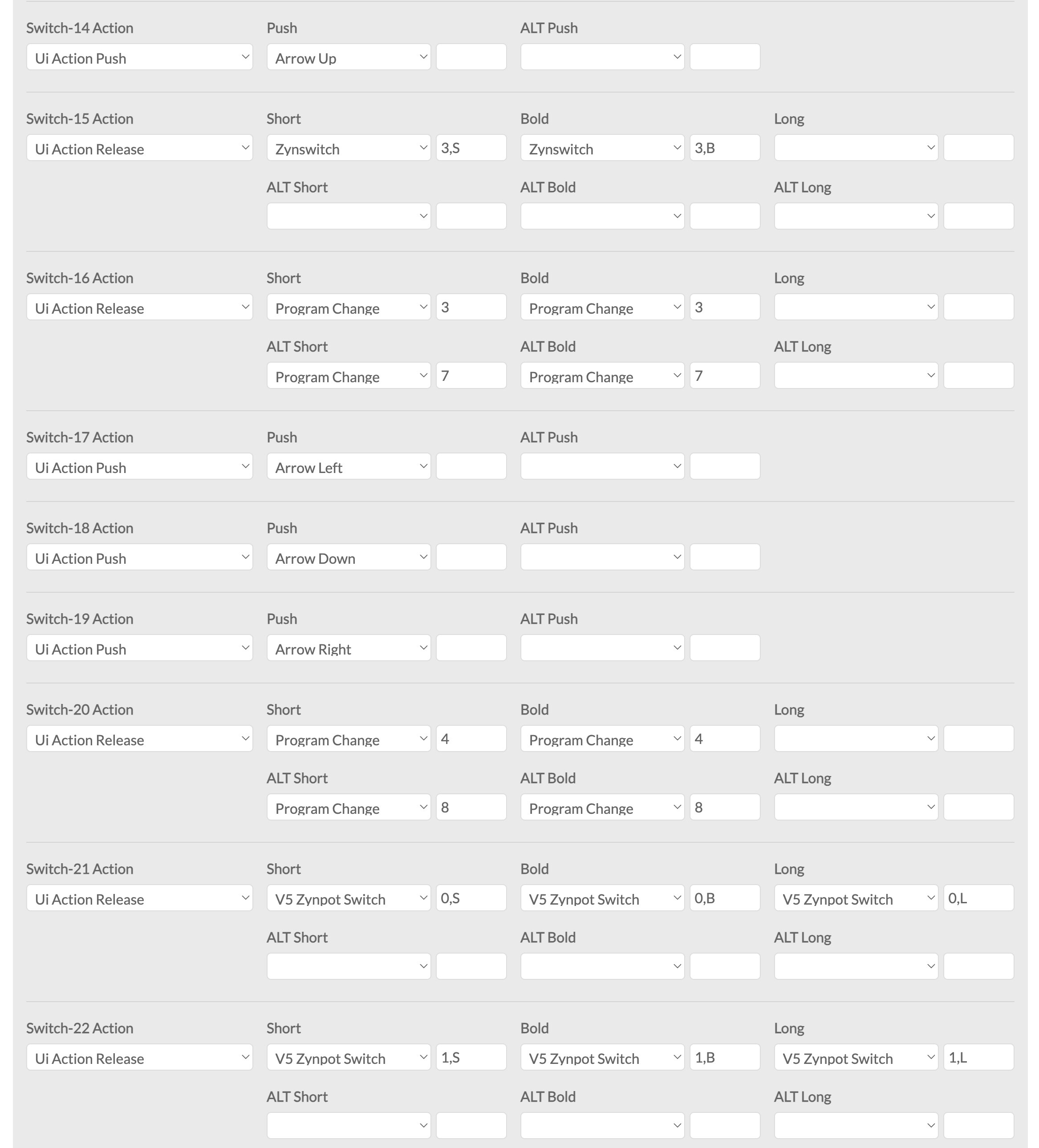
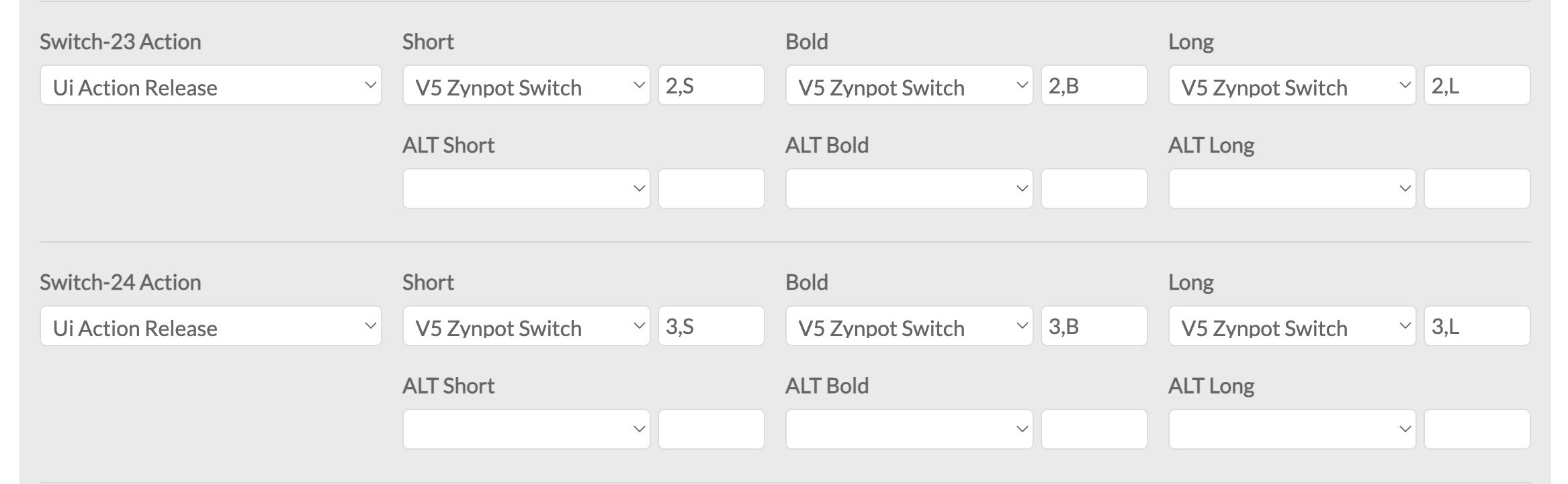
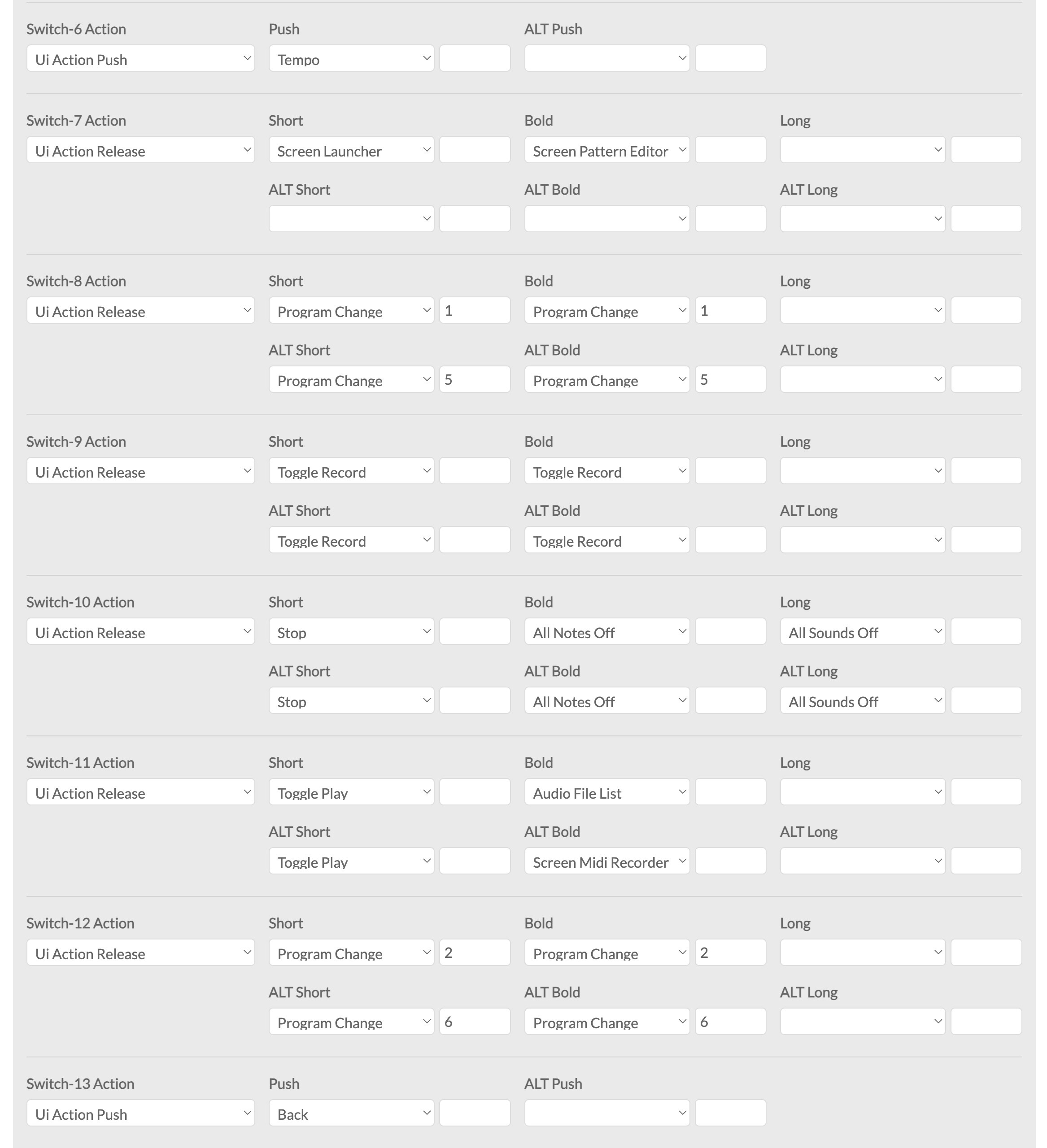
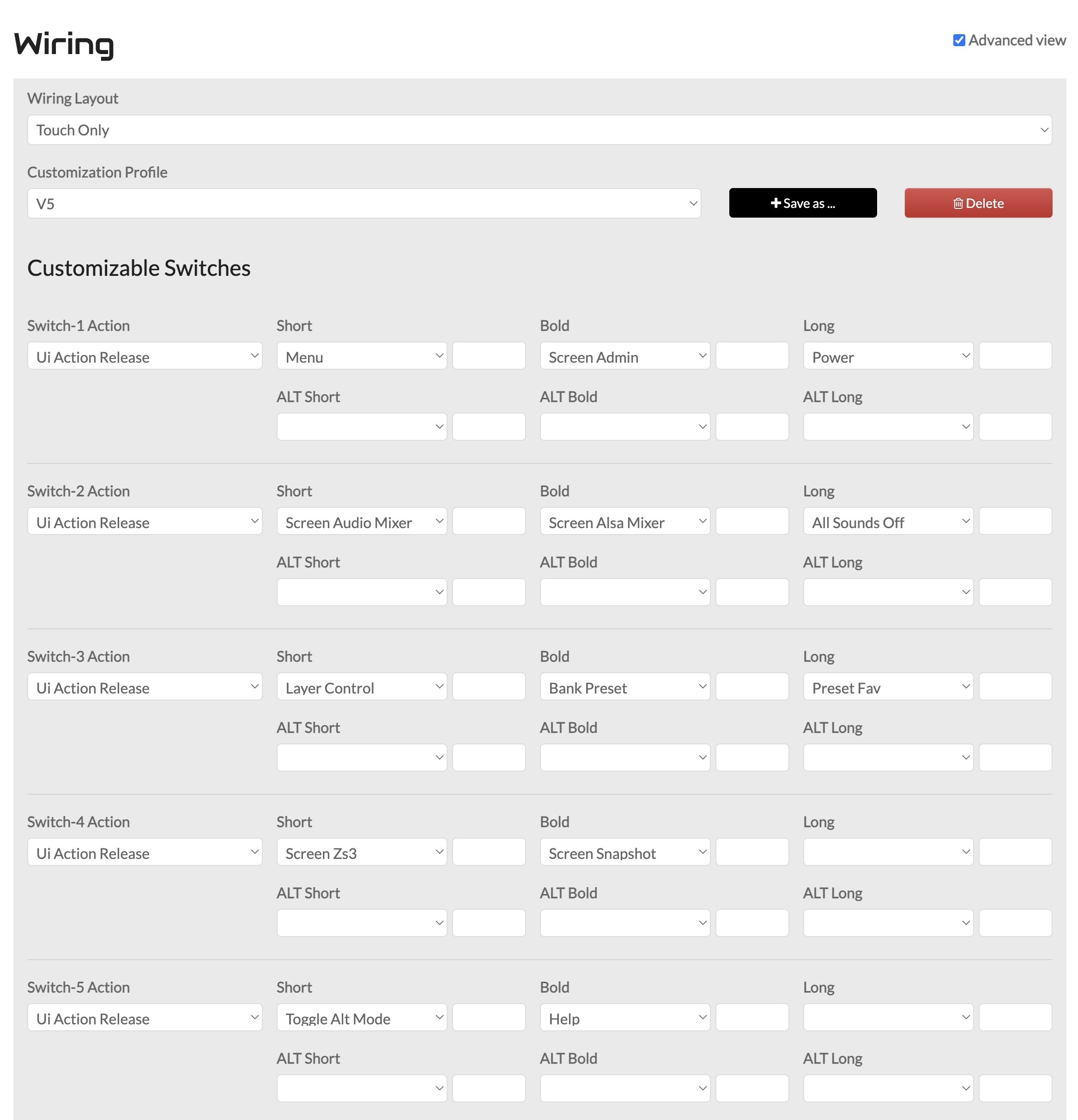
I reckon it is most likely that your wiring configuration is the problem. What do you have configured in webconf HARDWARE->Wiring? Look at a specific button on the V5 overlay, e.g. OPT|ADMIN and see what is configured for the corresponding button in webconf, e.g. Switch-1 Action. Also show your Wiring Layout and Customization Profile config.
This has been indeed a very sensible GUI touch, that conveys a sort of aptic feeling of physical response, even through the mediation of the pointer’s action. I look forward to experiencing it also on my other Pi5 touchscreen build, for which I just got a useful USB caddie fos uSD cards (Oram will stay on the nvme drive, for the time being).
Thanks for your feedback @riban: later this evening, from home, I will check and post my wiring configuration.
Hi @Aethermind - could you provide a bit more info on what this caddie is-does - I tried asking Google-Gemini and got some results but I did not find anything that really fit.
I made a bit of investigation, with the aim of setting manually an USB-SD-nvme boot order in config.txt, on one of my builds (BOOT_ORDER=0xf614), and decided to pull the trigger on the inexpensive model in the attached link. I received it just yesterday and hadn’t time to test it, but it looks like the right piece of gear for some Zynthian rescue booting on Pi5, presenting a single slot/LUN for uSD (thus avoiding format and protocol conflicts) with theoretical transfer speeds up to 200 Mb/s read and 150 Mb/s write. It might not be as proven and Raspberry-popular as the SanDisk MobileMate UHS-I, but it promises to work just fine with overall better performance. Let’s see!
Indeed @harrylnorris, as per my previous post . It has been recently and also earlier discussed how to set a Raspberry system, with a boot order that prioritises an SD card mounted in an USB dongle, before attempting the internal SD slot and then nvme. Be aware, however, that the access speeds from SD on USB stick don’t match the internal uSD performance, and that this convenient workaround doesn’t equal having the OS written directly to a quality USB drive.
I saw this exact behavior trying to setup my new touchscreen in Vangelis: pointer follows the finger but when clicking over any button no action is triggered, although button shows click animation. As long as It was first time using my new touchscreen i thouhgt It was because a wrong setup.
I then decided to step back to Oram to make my touchscreen to work properly. I think I am very close to get It.
One triggers when a button is pushed and the other triggers when a button is released. The release action allows for short, bold and long actions to be detected. Most on my touch-only device are set to release with just these set to push:

 . It has been recently and also earlier discussed how to set a Raspberry system, with a boot order that prioritises an SD card mounted in an USB dongle, before attempting the internal SD slot and then nvme. Be aware, however, that the access speeds from SD on USB stick don’t match the internal uSD performance, and that this convenient workaround doesn’t equal having the OS written directly to a quality USB drive.