OK, I think I see your point, thank you. I still think it would be lovely if we could do something to address the frustration that people feel when they can’t find the instrument they’re looking for, and I like the direction this conversation is going.
Great to see you were able to use the (very alpha) vangelis branch to create real music. Well done! The feedback is useful.
Manipulation of phrases and sequences needs improving, e.g. I want to be able to move a sequence, not a whole phrase. We are changing the way the timebase works which may reduce the need or change the way you want this to work.
I tried to minimise the menu options. I designed it so that you can usually insert where you want/need but it is easy to move a phrase. Let’s see if people get used to / accept this behaviour.
I am nervous of this. If the GUI is autonomously moving the view, it may do so at an inopportune moment, e.g. you are just about to press a sequence button and it moves under your finger resulting in the wrong sequence being launched. Also, you may want to be working in part of the screen / scrolled view whilst other stuff is happening. Let’s see how we get on with this. I feel the current behaviour is less pretty but more useful.
Yes it would. I started with lots of follow actions and reduced it (for various reasons). Adding back the STOP and JUMP options may prove popular.
Sounds like a bug. Add a ticket.
Sounds like a bug. Add a ticket.
I avoided suggesting this because we aspire to fewer menus but this may prove acceptable, maybe even optimal.
2 Likes
APC40 MK2 Is supported or it must be made a MIDI learn clip by clip?
APC40 Mk2 is supported in Vangelis. Indeed, It works pretty nicely 
1 Like
For those lacking webconf access right now, could an img of vangelis be shared? I didn’t see one on os.zynthian.org, and the image building thread linked from the wiki is old so may be outdated. Thanks
That’s a pretty solid idea. I usually run Zynthian with a live band, so being able to switch presets quickly is really useful—and I’ve already implemented it (yes, very much “vibe coding”). Performance-wise it’s acceptable so far, but I’m hoping the developers can optimize it further. In the screenshot, I also customized the top-bar icons for my dedicated menu entries. Thanks, Zynthian—you folks are awesome.
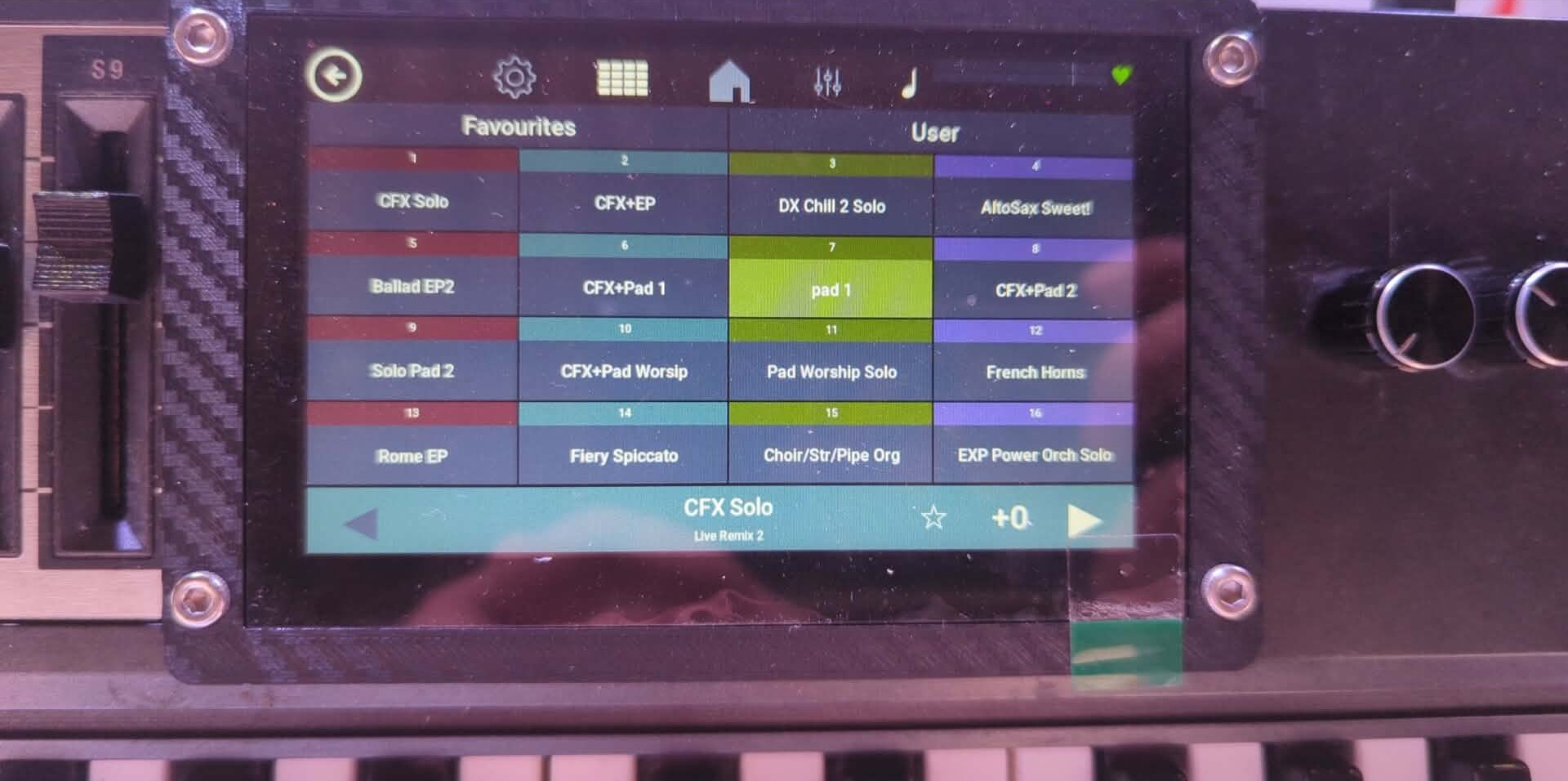
3 Likes
Thanks for the answer, i opened two tickets about the problems.
In the meanwhile i noticed that the phrase “player” is unable to recognize patterns with durations different than 1 bar or multiples. In a project i have a pattern with a lenght of 3 beats and if i play the pattern the reproduction is correct but when i play a phrase, the duration is always one full bar of 4 beats, even if i set the “Beats per bar” option to 3. Is this a bug or am i doing something wrong?
I usually pick up this sort of remark for recognition….
We are particularly interested in how these features are used in anger.
The clipplayer sits at an interesting crossover point for Human interaction, and the Capture Workflow in admin of a number being performed at a gig would be interesting to see.
We are currently developing that exact bit. My initial implementation is undergoing some changes by @jofemodo. It’s not fully working yet and there are some workflow considerations to be decided. This was discussed at zynthclub which helped inform the development. Give us a few days and we should have something to show and tell.
1 Like
This should work in the last version.
Regards,
2 Likes
Yes, i’m testing and it seems it’s working!
1 Like
Do Scenes still exist in zynbleton? I ask because I’m porting the APC Key25 drivers and am stumbling on them because of switching support etcetera. And I cannot find a way to switch/manage scenes from the UI anymore.
Or are they just not accessible right now from the UI waiting for a return? I see the concept is still there within the code (as in: one often has to reference the current scene when doing something with phrases or sequences).
You are correct. Scenes still exist but we currently only expose scene 1.
The font in the mixer view and launcher view is too large. Labels spill over their areas and are almost unreadable chaos.
How about a font size selector in UI prefs for these?
Maybe with selector for a different font than that for the menus?
The buttons/fields in the chains view are too large.
How about a pref for this?
Screen size here is 1280×800 8’’
Could you send a screenshot?
Thanks
I’ve been using Vangelis for a few days. It’s mostly straightforward coming from Oram (and never having used until now) but there are a couple of things that aren’t working as expected.
The presets button in the instrument parameter screen doesn’t appear to work anymore. I thought my encoder button was playing up but I can hold the same button to turn all sounds off and it works fine. Booting up Oram on my other usb confirms the button still works fine in that screen.
The other one is that copying a pattern causes an error no matter what I try.
System shutdown only works some of the time. That is the shutdown process gives an error which is recovered and then puts me back at the mixer screen.
Another one, the beat counter in the top bar is not smoothly following the beat. E.g. with a 4 to floor kick and watching that counter, it’s all over the place.
1 Like
It has always been an issue that setting the font size in webconf has poor behaviour in some views. We try to do automatic sizing of fonts in some areas but that implementation is flawed. I was looking at this last week to try to resolve the issue on smaller (3.5" 480x320) but the challenge I hit was that object size is only known after it is drawn, making it a challenge to ensure differnent length text at different fonts always show properly. I would prefer to avoid the need for each user to tweak many parameters to get the view to work. It should just be a case of selecting a font size to suit your visual access and the system does the rest to make that fit. I hope to see improvements in this soon.
I assume you are using a V4. This has changed to make the UI more intutive!!! (I know - nothing is intuitive - it is all learned behaviour!) Bold press encoder 1 (LAYER) to access presets.
I don’t see that behaviour. Copy to clipboard and paste from clipboard works for me. Report to issue tracker with as much info as you can give.
This is likely the segfault that has been mentioned. We are yet to investigate.
I know - it is terrible!!! Sorry! It currently uses a combination of sequencer polling and screen refresh which combine to form a very jittery response. It needs improving (or removing???) but is lower on the priorities than other stuff. Please add a ticket to the issue tracker so we don’t forget it.
I hope for improving, it seems a really useful feature for me! But i’m not trying to push any priority 
Works for me too
Sorry, I could have been more detailed with that comment. What I mean is, I can save a pattern from the pattern menu successfully but when I try to load that pattern into a new empty spot it will always error. The same thing happens when using ‘clear pattern’ from the menu. I added a comment to @Nicolaz ‘s issue about the clear pattern error. If they are distinct issues then I can create a separate one.
Save / load pattern is very different to clear pattern and very different to copy / paste pattern.
I believe copy/paste works. Clear pattern should work but is subject to the bug report you mention. Save / load pattern uses a new file format. (We moved from binary format to json for both the sequencer state and saved patterns.) This has not been extensively tested so yes, please report on a separate ticket.