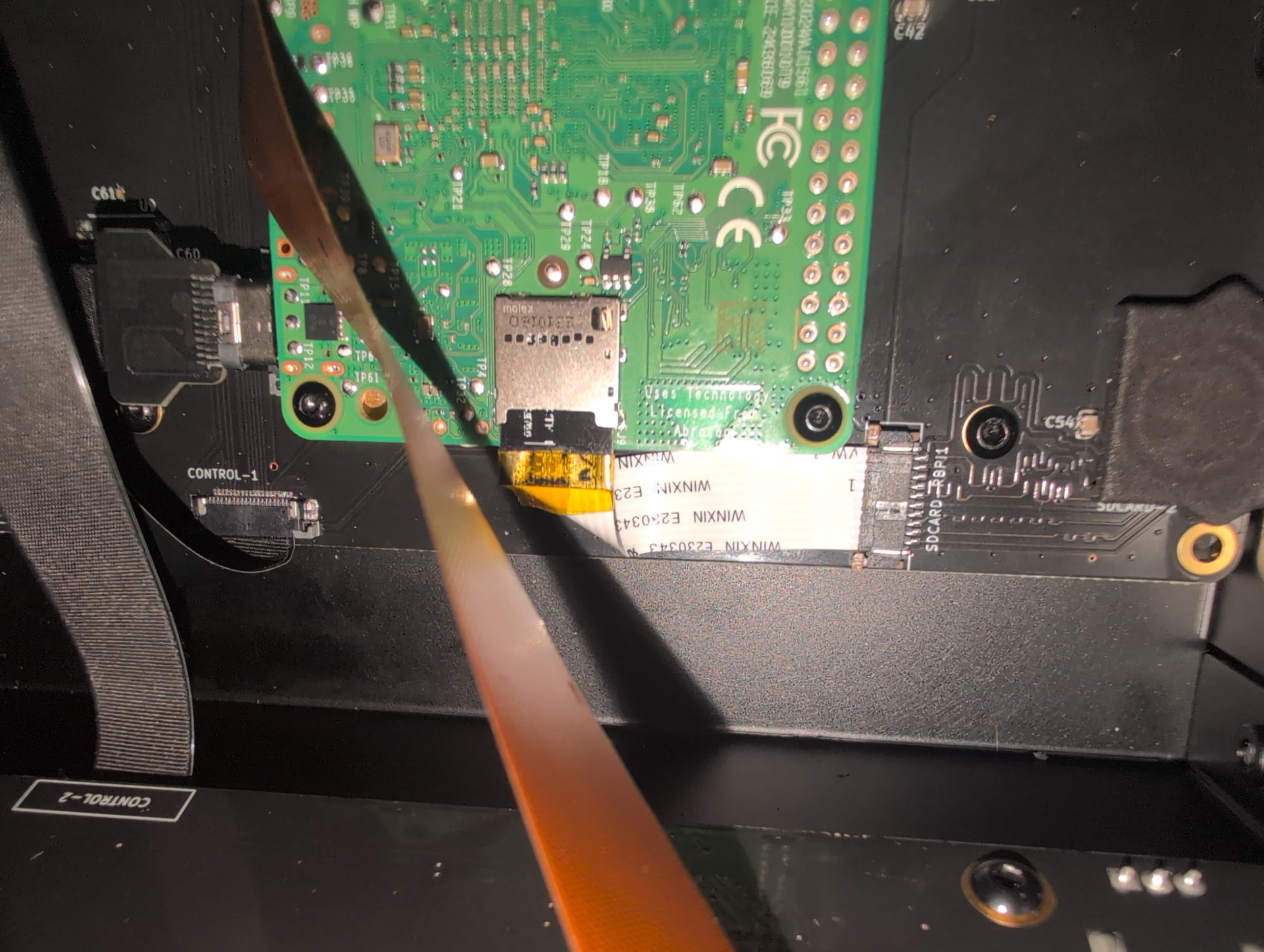
I recently purchased a Zynthian V5.1 and building it went swimmingly.
However, I can’t get it to boot to the actual interface, or get into the webUI unless I manually start zythian_webconf.py or zynthian_webconf.sh. When I manually start zynthian.sh too it loads the splash screen but gets stuck on that until I cancel the process.
Looking through the logs with journalctl, it looks like there are many systemd units not starting up due to bad unit file settings.
Hello @ArcticSin and welcome. What brand and size of SD Card are you using? I would suggest not going above 64 GB and using SanDisk or Samsung, and using Raspberry Pi imager.
You could try opening the case and putting the SD Card directly in the RPi for troubleshooting purposes.
Here’s a thread about SD Cards that may provide some good info and tips:
It’s a Sandisk Extreme Pro 32gb, and was flashed using rpi-imager on my Steam Deck. I will try putting it directly into the RPi and let you know what happens.
Sounds good. I would recommend rewriting a fresh image to the sd card before retrying the boot. Because Zynthian tries to figure out what kind of hardware it is running on and saves that info on the sd card, so if you fix a hardware issue you can still get bad results if you don’t re-flash the image. It can be quite confusing. I would also suggest trying a different brand or type of card.
First boot can take a few minutes sitting at splash screen!
Good, that shows we’re in the right area, but no, it might be a faulty cable, or mainboard, but it’s still much more likely that the SD Card is the culprit. Could you try another card from a reasonably solid vendor and brand and see if it works? Have you read the link above, SD-cards for Zynthian V5? It provides a lot more info and a link to a video also about the issues, which mostly relate to accessing the card faster with RPi5, although there were issues with counterfeit cards way before the RPi4 as well!
I’d have to go get another SD card since this is the only one I have at the moment, but this issue only seems to be happening when I use it through the cable. It’s perfectly fine with SD card reader on the pi itself. But I’ll look into acquiring one directly from the manufacturer to guarantees I don’t get a counterfit one.
OK, it’s your choice which to try first, cable or card. It makes sense to have a few SD Cards for a Zynthian in order to allow you to switch versions without destroying the current one. Good luck with buying directly from the manufacturer, the closest I’ve gotten is an authorized distributor such as Digi-key.
I completely forgot to actually do this after getting the zynthian to work (with the sd card plugged right into the pi), but I’m going to get some various SD cards tomorrow.
I received the replacement ribbon cables today. Both of them still had the same issue, and with all 3 of my new SD cards.
Systemd starts up on the screen upside-down, a network-manager-wait something service fails to start, and it repeats trying to start the alsa to jack bridge and timidity services until it goes through the rest and gives up to getty. I also can’t ssh until I manually reset. If I do, it still doesn’t get to the splash screen.
What could be going on? It works perfectly when the sd card is plugged into the raspberry pi (I’ve even been using it all this time as such) but not with the ribbon cable.
Forget that, I guess I had to leave it there for like 20 minutes, because it now just booted up properly. Don’t know what fixed it but thanks for the replacement parts!
Edit: Although using the UI and modifying stuff via the web UI are much slower than when plugged directly into the rpi. Maybe all three of my micro sd cards just suck. I’ll keep updated.
Is it possible that what I’m using to flash the SD card is causing the issues? I am flashing the sd card from a steam deck, maybe I should try a normal Linux PC? It’s with the raspberry pi imager flatpak regardless
I don’t think so, because of the card working when you plug it in directly, but it’s certainly worth a shot.
Here are the possibilities I see as the source of the issue:
It’s still the actual sd card(s) - I realize you’ve tried different ones already. You could try actually getting an ‘official’ Raspberry Pi card.
It’s a problem with the Mainboard itself, perhaps even the flat cable connector on the Mainboard.
It’s something about how you connect the Pi-Mainboard cable. For example not inserting it fully.
It’s a design problem - some type of worst case timing issue with the SD card traces or components. I wonder if you can set something to slow down the SD Card access.
I don’t speak for Zynthian Labs, but I think @jofemodo (who does) would be willing to swap Mainboards if-when we’ve exhausted the other possibilities.
I am sorry you’re having to deal with this much trouble and wish I had better suggestions. Hopefully working with the card directly in the RPi has shown you that Zynthian is worth it.
I have a micro center near me so I’ll try getting an official rpi sd card and see what happens.
I do think it has something to do with the read/write speeds, I couldn’t even get it to test an update properly or even install something small like vifm through ssh.
I could open it up and take a picture of cable so you can tell me if it’s seated properly or not.
And I absolutely love the Zynthian btw, I use it in conjuction with Reaper and Rosegarden as a sort of modern Sound Canvas type thing since I’m teaching myself to make video game soundtracks. If in order to keep using it means I have to take the back cover off whenever I need to change the SD card (which I can’t imagine I’ll have to do often) then so be it. It’s more of a minor inconvenience than anything else.